If you’re grinding in Raft 101 [Alpha], you already know how slow and repetitive progression can be. That’s why many players are using the Raft 101 script to unlock powerful features like Auto Farm, Teleport Items, and God Mode — all without a key system.
This script is designed to automate the most time-consuming parts of the game. With Auto Farm, your character can continuously collect materials and rewards without manual input. The Teleport Items feature instantly pulls nearby loot and dropped items directly to your character, saving minutes of swimming and searching. Combined with God Mode, you can survive hostile mobs, environmental damage, and risky exploration without worrying about dying.
Because Raft 101 is still in alpha, updates happen frequently. This script is lightweight and flexible, meaning it continues to work smoothly across most recent patches. Players use it to progress faster, experiment with builds, and explore the map freely without resource limitations.
Another big advantage is that this is a no-key script, so you don’t need to complete ads, redirects, or verification steps. Simply execute the script and enable the features you want. This makes it ideal for both casual players and advanced Roblox users who want a clean, fast setup.
If you’re looking to dominate Raft 101, speed up your grind, and enjoy the game without restrictions, this script is one of the most effective tools available right now.
Key Features
- Item Selector System
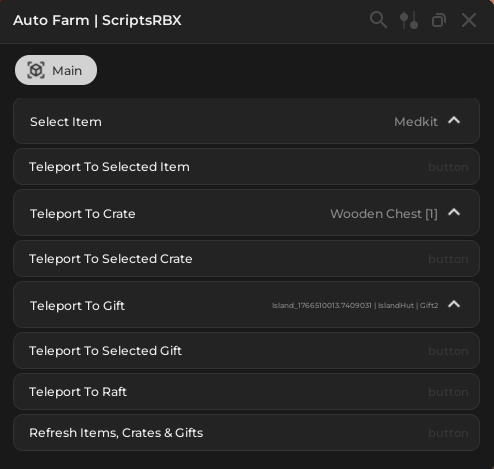
Choose specific items (e.g. Medkit) directly from the GUI. - Teleport to Selected Item
Instantly teleport your character to the chosen item location. - Crate Teleportation
Select crate types (e.g. Wooden Chest) and teleport to them instantly. - Gift Teleport
Locate and teleport to gifts across islands and huts. - One-Click Teleport Buttons
Fast teleport actions without typing or manual navigation. - Teleport to Raft
Instantly return to your raft from anywhere on the map. - Live Refresh System
Refresh items, crates, and gifts to keep teleport targets updated. - Clean ScriptsRBX UI
Minimal, fast, and easy-to-use interface designed for efficiency. - No Key Required
No verification, ads, or link shorteners.
Download the Raft 101 [ALPHA] Script:
loadstring(game:HttpGet("https://raw.githubusercontent.com/ScriptsRBXdotCom/scripts/refs/heads/main/raft101"))()How To Use
- Copy the script from this page
- Join Raft 101 [Alpha] on Roblox
- Open your Roblox executor
- Paste and execute the script
- Use the GUI to select items, crates, or gifts
- Click teleport buttons or enable auto features
- Instantly collect resources and move around the map with ease
Your character will immediately gain access to Teleport Items, Crate Teleport, Gift Teleport, and fast navigation back to the raft.
Final Thoughts
This Raft 101 [Alpha] Script is one of the easiest and fastest ways to progress right now. With instant teleportation to items, crates, gifts, and your raft, you can skip the slow grind and focus on exploration and building.
Because Raft 101 is still in alpha, updates are frequent — and this script is designed to stay compatible as new content is added. If you want faster farming, easier navigation, and a smoother experience without a key system, this script is a must-use.
Be sure to check back regularly for updates when new items, crates, or islands are released.
FAQ Schema
Is the Raft 101 script keyless?
Yes, this script is completely keyless and does not require ads, link shorteners, or verification.
How does Teleport Items work?
You select an item from the GUI and click the teleport button to instantly move to its location.
Can I teleport to crates and gifts?
Yes, the script allows you to teleport to selected crates and gifts anywhere on the map.
Is this script safe to use?
The script is widely used, but as with all Roblox scripts, use at your own risk.
Will this script be updated?
Yes, updates are released when Raft 101 receives new alpha patches.
👉 Browse all Roblox scripts:
https://scriptsrbx.com/scripts/