
Looking for the latest Crunch My Butter Script? This automation menu includes useful features for farming, purchasing upgrades, improving workers, and progressing through the game with fewer repetitive actions.
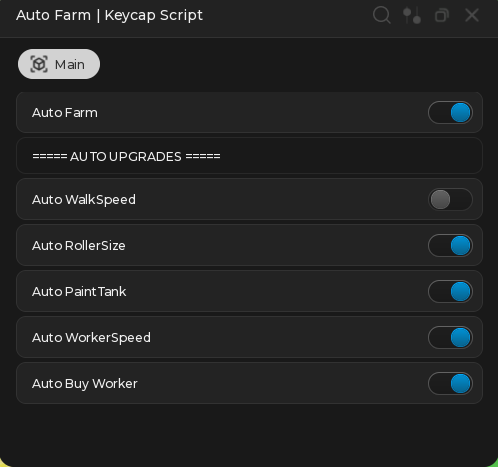
The interface shown is labeled Auto Farm | Keycap Script and uses a simple toggle-based design. Players can activate individual options such as Auto Farm, Auto Roller Size, Auto Paint Tank, and Auto Buy Worker without enabling every feature at once.
Our goal is to provide an organized script page containing details about the available features, expected compatibility, update status, and important account-safety considerations.
Features
- Auto Farm
- Auto WalkSpeed
- Auto Roller Size
- Auto Paint Tank
- Auto Worker Speed
- Auto Buy Worker
- Simple toggle interface
- No-key access
- Automatic upgrade management
- Mobile and PC-friendly menu design
- Regular compatibility updates
The menu gives players control over which automation options are active. For example, you can enable Auto Farm and Auto Paint Tank while keeping Auto WalkSpeed disabled.
Download Crunch My Butter Script:
loadstring(game:HttpGet('https://raw.githubusercontent.com/ScriptsRBXdotCom/scripts/refs/heads/main/butter'))()Why Use Crunch My Butter Script?
Crunch My Butter includes a progression loop based on farming, collecting resources, improving equipment, and purchasing workers. Completing the same actions repeatedly can take a considerable amount of time.
The Crunch My Butter Auto Farm Script is designed to reduce repetitive gameplay by automating selected parts of this loop. Players can use separate toggles to control farming and upgrade purchases.
Its main advantages include:
- Less repetitive clicking
- Faster farming cycles
- Automatic equipment upgrades
- Improved worker management
- Customizable automation options
- Easy-to-understand controls
The ability to enable features individually is useful because players may not want the script to spend all of their currency automatically.
Auto Farm
The Auto Farm feature is the main automation option included in the menu.
When activated, it is intended to repeat the game’s standard farming process without requiring the player to perform every action manually. This can make resource collection more consistent during longer gameplay sessions.
The exact farming behavior may depend on the current game version. Updates to the map, tools, collection system, or remote events can temporarily affect compatibility.
Auto WalkSpeed
Auto WalkSpeed is designed to handle movement-speed upgrades automatically.
Increasing movement speed may help players travel more quickly between farming areas, upgrade stations, workers, and selling locations. Faster movement can also reduce the amount of time spent moving between each stage of the gameplay loop.
This option can be disabled when players prefer to save their currency for roller, tank, or worker upgrades.
Auto Roller Size
The Auto Roller Size feature automatically purchases available roller-size upgrades.
A larger roller may cover more space during farming and help players collect or process resources more efficiently. Because roller upgrades can consume a significant amount of in-game currency, players should monitor their balance when this option is enabled.
This feature may be especially useful after the player has already improved basic movement speed and storage capacity.
Auto Paint Tank
The Auto Paint Tank option is intended to improve the player’s storage capacity automatically.
A larger paint tank may allow players to continue farming for longer before they need to sell, deposit, or process collected resources. This can reduce interruptions and create a more efficient farming cycle.
Combining Auto Paint Tank with Auto Farm may help maintain longer automated sessions, depending on how the current game mechanics work.
Auto Worker Speed
The Auto Worker Speed feature focuses on upgrading worker performance.
Faster workers may complete their tasks more quickly and increase passive production. This feature can become more valuable as the player unlocks additional workers and begins relying more heavily on automated production.
Worker-speed upgrades may compete with equipment upgrades for currency, so users should choose their active options carefully.
Auto Buy Worker
Auto Buy Worker attempts to purchase additional workers whenever the necessary in-game currency is available.
Additional workers may increase production and help the player expand faster. However, automatic purchases may also spend currency that the player intended to use for Roller Size, Paint Tank, or WalkSpeed upgrades.
Players who want more control over their spending can temporarily disable this feature.
How the Crunch My Butter Script Works
The script uses a menu with toggle switches for each supported feature. A blue or active toggle normally indicates that the option has been enabled, while a gray toggle indicates that it is disabled.
The menu shown contains the following controls:
- Open the script interface.
- Join Crunch My Butter! | Play on Roblox
- Enable Auto Farm.
- Select the automatic upgrades you want to use.
- Leave unwanted purchase options disabled.
- Monitor your in-game currency and progress.
- Disable the features before leaving or changing servers.
The exact process can vary depending on the script executor, device, and current Roblox version.
![[🔥UPDATE] Clean The Library Script – Auto Clean, Auto Sort & Book Save (2026)](https://scriptsrbx.com/wp-content/uploads/2026/06/Screenshot_20.png)