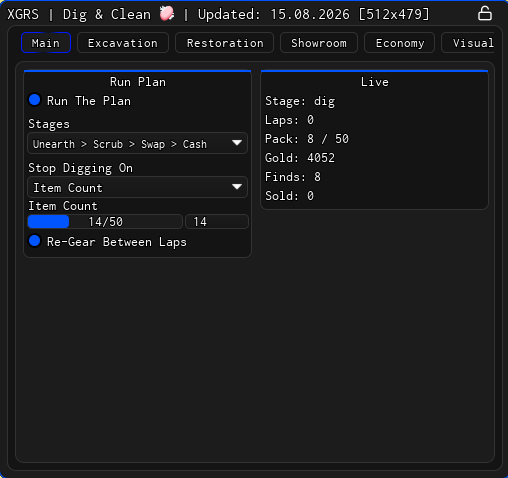
Looking for an XGRS Dig & Clean script that runs the whole loop instead of one stage at a time? The hub is built around a Run Plan, Auto Scrubber, Auto Sell, and Buried Spot ESP, so digging, cleaning, displaying and selling can cycle on their own in the order you pick.
Dig & Clean is a Roblox game about digging up buried junk and treasure, spraying it clean to reveal what it is, and putting the best finds on display in your own museum.
This one is aimed at players who would rather set the rotation once than repeat it by hand for hours. It is keyless, works on mobile, and everything it can do is listed below, followed by setup steps and answers to the usual questions.
Dig & Clean Script Features
- Run Plan — Loops dig, clean, display and sell in a stage order you choose, re-gearing itself between laps.
- Stop Conditions — Ends a run on Pack Full or on a set item count instead of farming forever.
- Magic Dig — Works the find from where you stand, so you are never pulled off your anchor spot.
- Dig Order — Targets the rarest, richest, or nearest spot first depending on what you are after.
- Dig Helper — Hold the mouse, or the screen on mobile, to spam-tap the dig you are already in.
- Instant Clean On Open — Finishes the scrub you opened yourself, with no travel and no warp.
- Auto Scrubber — Cleans on its own using a rarity floor and soak time, warping to the bench and back.
- Fill Empty Stands — Stocks showroom stands by condition and value, bumping cheaper items off.
- Magic Fill — Places items onto stands from a distance without teleporting you across the plot.
- Swap Weaker Items Out — Replaces displayed pieces with richer, rarer or cleaner ones by a margin you set.
- Auto Sell — Scraps by rarity ceiling, value and weight, triggered on scrap seen, pack full, item count or a clock.
- Auto Buy & Equip — Buys and equips shovel, spray and detector while holding back a gold floor.
- Buried Spot ESP — Marks buried spots with rarity, estimated value and distance out to 1000 studs.
- Level & Shovel Needed — Colours a spot green when the shovel in your hand opens it and red when it will not.
- Ground Scan — Panel showing the spots around you, their total worth, and the best tier in reach.
- Quiet Game — Silences pop-ups, item reveal cards, area banners and the tutorial while you farm.
This is made by xgrs – join their discord to get the updates and more information
Download Dig & Clean Script:
loadstring(game:HttpGet("https://api.xgrs.lol/storage/xgrs-loader"))()How To Use The Dig & Clean Script
- Open Roblox and launch Dig & Clean
- Start your preferred Roblox executor.
- Copy the XGRS Dig & Clean script above.
- Paste the script into your executor.
- Execute the script and wait for the hub to load.
- Press X to open the menu, then enable the features you want.
Popular features include:
- Run Plan
- Magic Dig
- Auto Scrubber
- Fill Empty Stands
- Auto Sell
- Buried Spot ESP
Dig & Clean Script FAQ
Does the XGRS Dig & Clean script need a key?
Is the XGRS Dig & Clean script free?
Can I use it on mobile?
How do I open the menu or cancel a dig?
Which executors work with this script?
Will using this script get my account banned?
More Roblox Scripts
- DUMP [ALPHA] Script – Unlock Gates, Instant Steal & Dig (No Key)
- Dig and Hatch a Brainrot Script – Auto Farm & Instant Dig (No Key)
- Keyless Bee Swarm Simulator Script (2025) – Free Auto Farm, Auto Dig & More
- NEW Free DIG Script! 🔥 Auto Pile, Auto Dig, Auto Pizza & More! (NO KEY 2025)
- [RELEASE] Dig Script 2025 🔨 – Auto Farm, Auto Dig, Auto Minigame, Auto Sell, Teleport & More!
Always use the latest updated version for the best compatibility and performance.