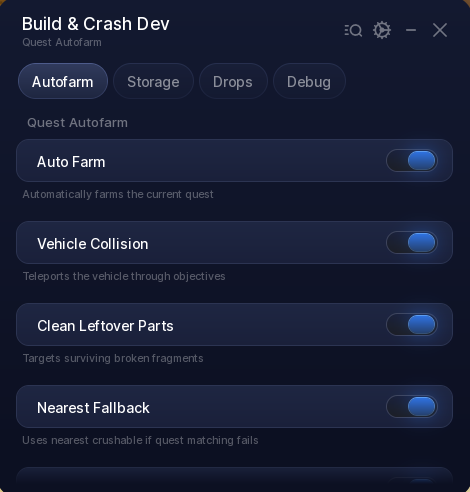
Looking for a Build and Crush script that runs the quest loop for you? This hub handles it with Auto Farm, Vehicle Collision, Auto Claim, and Auto Reset Full Storage, so quests get crushed, rewards get claimed and runs restart themselves when storage fills up.
Build and Crush is a Roblox game about demolishing structures with a vehicle, completing the quests attached to them, and cashing in what you break.
The hub is keyless and built around leaving it running. Beyond the toggles there are sliders for approach distance, collision depth and every delay in the loop, so the farm can be tuned to the way you play. Everything it does is listed below.
Build and Crush Script Features
- Auto Farm — Automatically farms the current quest from start to finish.
- Vehicle Collision — Teleports the vehicle through objectives instead of driving it into them.
- Clean Leftover Parts — Targets surviving broken fragments so nothing is left standing.
- Nearest Fallback — Falls back to the nearest crushable object when quest matching fails.
- Character Fallback — Switches to a character teleport whenever the car is not available.
- Auto Claim — Attempts quest reward claims on its own as they come up.
- Approach Distance — Sets how close it gets before hitting, anywhere from 1 to 30 studs.
- Collision Depth — Controls how far through an objective it pushes, from 0 to 20 studs.
- Vertical Offset — Nudges the hit point up or down when the default height misses.
- Cleanup Passes and Radius — Up to 30 sweeps across a radius you set between 50 and 1500 studs.
- Farm Delay — Paces the loop between 0.1 and 2 seconds to suit the server you are on.
- Auto Reset Full Storage — Ends the run once storage fills and immediately starts a fresh one.
- Reset Threshold — Choose the storage percentage that triggers the reset, from 50 to 100.
- Run Controls — Start a run, end one, or test the storage reset by hand at any point.
- Auto Collect Item Drops — Picks up spawned item drops as they appear during a run.
- Debug Tools — Print the current quest, target, vehicle or remaining fragments when something looks off.
This script is written and maintained by Ryx at scriptsrbx.com – it is updated here first whenever the game changes
Download Build and Crush Script:
loadstring(game:HttpGet("https://raw.githubusercontent.com/ScriptsRBXdotCom/scripts/refs/heads/main/BuildCrash"))()Last checked: August 23, 2026 on the Delta executor — script attached and the menu loaded. Game updates can break scripts at any time; the developer’s Discord above usually has the newest version.
How To Use The Build and Crush Script
- Open Roblox and launch Build and Crush
- Start your preferred Roblox executor.
- Copy the Build and Crush script above.
- Paste the script into your executor.
- Execute the script and wait for the panel to appear.
- Turn on Auto Farm from the Autofarm tab and leave it running.
Popular features include:
- Auto Farm
- Vehicle Collision
- Auto Claim
- Clean Leftover Parts
- Auto Reset Full Storage
- Auto Collect Item Drops
Build and Crush Script FAQ
Does the Build and Crush script need a key?
Is the Build and Crush script free?
What do the Autofarm sliders actually change?
What happens when my storage fills up?
Can I use it on mobile?
Will using this script get my account banned?
More Roblox Scripts
- Crunch My Butter Script (2026) – Auto Farm, Auto Upgrades & No Key
- Anime Expeditions Script (2026) – Auto Farm, Auto Play, Macro, OP Script No Key
- Land or Die Script 2026 – Auto Farm (Working & Free)
- Anime Astral Simulator Script – Auto Farm, Auto Fight, Auto Hatch & More (2026)
- Build A Ring Farm Roblox – Features, Auto Farm & Infinite Rings Script Tips
Always use the latest updated version for the best compatibility and performance.