Mukuro Hub
An amazing hub created by Mukuro, offering a robust and user-friendly interface designed for Blox Fruits players to maximize their in-game experience. It supports a variety of popular executors, including:
- Delta
- Codex
- Arceus X
Join Their Discord! For more updates & and more scripts and information!
Download Script:
loadstring(game:HttpGet("https://auth.quartyz.com/scripts/Loader.lua"))()Key Features:
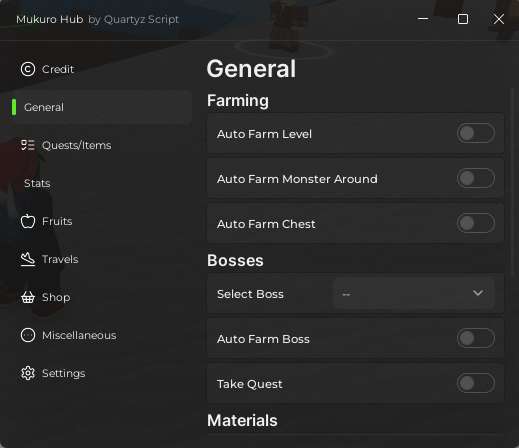
Here are some of the standout features visible in the interface:
- AutoFarm Options:
- Automatically farms based on your level and quest.
- Includes options like Auto Dressrosa and Auto Zou.
- Adjustable Mastery Farm with health percentage control.
- Mob Aura:
- Enables mob aura for efficient farming.
- Auto Quests:
- Auto Castle Raid.
- Auto Citizen Quest.
- Auto Elite Hunter.
- Ken Status & Observation Training:
- Tracks Ken Status with a delay of 120 seconds.
- Features auto-training for observation with an optional rejoin function.
- Combat Settings:
- Activate Buso and Observation Haki.
- Bypass teleport (warning included about potential risks).
- Adjustable level cap and lock settings.
- Boss Functions:
- Auto Killing Boss.
- Auto Killing All Bosses.
- Accept Boss Quests.
More scripts here -> https://ScriptsRBX.com/scripts/
How the Blox Fruits Script Works
Mukuro Hub centres on levelling. Its AutoFarm reads your current level and quest, then farms the matching mobs on its own, with island options like Auto Dressrosa and Auto Zou. An adjustable Mastery Farm lets you set a health percentage for mastery grinding, and Mob Aura clears nearby enemies while it all runs.
Quests and bosses get the same treatment: Auto Castle Raid, Auto Citizen Quest and Auto Elite Hunter run themselves, and the boss functions accept boss quests then kill one boss or every boss for you. On the combat side you can keep Buso and Observation Haki active, track Ken status on a 120-second delay, and auto-train observation with an optional rejoin — your job is mostly choosing which toggles fit the grind.
Tips for Using the Blox Fruits Script
Getting the most from Mukuro Hub is mostly about sensible settings.
- Set the Mastery Farm health percentage conservatively at first — leaving mobs alive slightly longer builds mastery without outpacing your damage.
- Use the level cap and lock settings to stop at a target level instead of blowing past a quest bracket overnight.
- Treat bypass teleport carefully — the hub itself warns about potential risks, so keep it off unless needed.
- Turn on rejoin when auto-training observation so a disconnect does not end your session.
- Let Accept Boss Quests run alongside the boss killers so kills count toward rewards.
Blox Fruits Script FAQ
Does the Blox Fruits script need a key?
Is the Blox Fruits script free?
Does the Blox Fruits script work on mobile?
Why did the Blox Fruits script stop working?
Can I get banned for using the Blox Fruits script?
More Roblox Scripts
- Merge a Spinner Script – Auto Merge, Auto Buy, Auto Place Best & Auto Fight
- Roblox Carve Wood Script – Auto 100% Accuracy Carve (No Key)
- Crunch My Butter Script (2026) – Auto Farm, Auto Upgrades & No Key
- Anime Expeditions Script (2026) – Auto Farm, Auto Play, Macro, OP Script No Key
- [🔥UPDATE] Clean The Library Script – Auto Clean, Auto Sort & Book Save (2026)