
Anime Avatar Fighting Script – Auto Farm, Auto Summon & Auto Upgrade
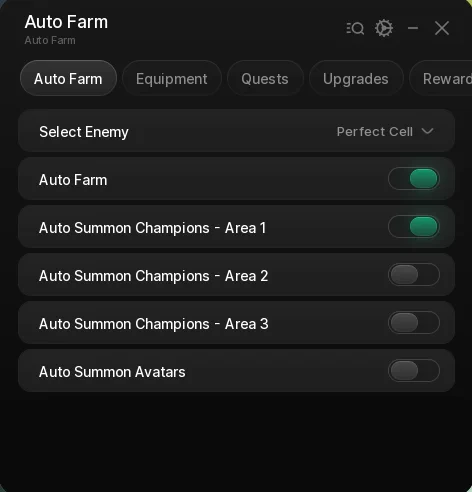
Looking for an Anime Avatar Fighting script that runs the whole grind for you? This one covers Auto Farm, Auto Summon for champions and avatars, Auto Equip, Auto Quests, Auto Upgrade and Auto Claim, spread across five tabs so you can switch on as much or as little as you want.
Anime Avatar Fighting is a Roblox experience where you build a squad of anime-styled fighters, clear enemies across three areas — Dragun Bol, Narutu and Wan Peace — and spend what you earn summoning stronger champions and avatars.
The script is aimed at players who would rather set a target once than click through every fight by hand. Below you can review the available functions, learn what each option does, and find basic usage information.
Anime Avatar Fighting Script Features
- Select Enemy — Dropdown listing every enemy currently in the world. It refreshes itself when enemies spawn or despawn, so the list stays current.
- Auto Farm — Locks onto the nearest enemy matching your pick and keeps you on it, skipping anything already dead.
- Auto Summon Champions - Area 1 — Rolls champion summons in Dragun Bol once per second while the farm keeps running.
- Auto Summon Champions - Area 2 — The same for Narutu, on its own toggle so you choose where your currency goes.
- Auto Summon Champions - Area 3 — The same for Wan Peace, for once you have the currency to reach it.
- Auto Summon Avatars — Rolls standard avatar summons on their own timer alongside the champion summons.
- Auto Equip Best Champions — Equips your strongest champions and re-checks every few seconds as better ones drop.
- Auto Equip Best Skins — Does the same for skins, so a good roll goes on straight away.
- Auto Equip Best Avatars — Does the same for avatars.
- Auto Equip All Best — One toggle that runs all three equip passes in sequence instead of enabling them separately.
- Auto Accept Hunt Quests — Builds a hunt quest for every area and enemy pair in the world and accepts them, so kills always count toward something.
- Auto Side Quest Chains — Accepts the fixed side quest chains, covering the three area lines plus the Mount and Kaidu chains.
- Auto Upgrade Range — Buys Range in every area, skipping any that is maxed or not sold there.
- Auto Upgrade Damage — Same for Damage, bought across all three areas.
- Auto Upgrade Attack Speed — Same for Attack Speed.
- Auto Upgrade Speed — Same for movement Speed.
- Auto Upgrade Coins — Same for the Coins multiplier.
- Auto Upgrade Crit Chance — Same for Crit Chance.
- Auto Upgrade Crit Damage — Same for Crit Damage.
- Auto Upgrade Everything — Runs all seven upgrades across all three areas on a loop instead of picking them one at a time.
- Auto Claim Achievements — Claims the damage, luck, coins, raid, egg and storage achievement rewards as they unlock.
- Auto Claim Free Rewards — Works through the free reward gifts on a timer.
- Auto Claim Daily Gifts — Claims each day of the daily gift track.
- Redeem All Codes — Fires the built-in code list once when you switch it on, so you are not typing them in by hand.
Like the Flatten The Mountain script, this one was written in-house by Ryx rather than mirrored from another developer — the loader is hosted on the ScriptsRBX GitHub. Join the Discord for updates: discord.gg/nXe86GVv9x
Download Anime Avatar Fighting Script:
1Last checked: September 1, 2026 on the Delta executor — script attached and the menu loaded. Game updates can break scripts at any time; the developer's Discord above usually has the newest version.
How To Use The Anime Avatar Fighting Script
- Open Roblox and launch Anime Avatar Fighting.
- Start your preferred Roblox executor.
- Copy the Anime Avatar Fighting script.
- Paste the script into your executor.
- Execute the script.
- Open the Auto Farm tab, pick your target under Select Enemy, then switch on Auto Farm and whichever summon toggles you want.
Anime Avatar Fighting Script Showcase
Want to see the menu before running it? The full showcase is on YouTube: Anime Avatar Fighting Script – Auto Farm, Auto Summon Champions, Auto Summon Avatars.
The video runs through the Auto Farm tab as it appears above: picking a target with Select Enemy, switching on Auto Farm, and leaving the champion and avatar summons running in the background.
Menu Layout
The menu is split across five tabs. Auto Farm holds the enemy dropdown, the farm toggle and the four summon toggles. Equipment handles equipping your best champions, skins and avatars. Quests accepts hunt quests and side quest chains. Upgrades buys the seven player upgrades. Rewards claims achievements, free rewards, daily gifts and codes.
Each tab runs on its own background timer, so you can leave several going at once — summons roll every second, equipment re-checks every eight, quests and claims every ten.
Areas
The three areas are Dragun Bol, Narutu and Wan Peace. The three champion summon toggles map to them in that order, and the upgrade options buy in all three areas rather than only the one you are standing in.
Anime Avatar Fighting Script FAQ
Is the Anime Avatar Fighting script free?
What does Auto Farm actually do?
Can I summon in more than one area at once?
Do the upgrades apply to every area?
Which executor should I use?
More Roblox Scripts
 +1 Karate Evolution Script – Auto Win, Auto Strike, Auto Grade & Auto Rebirth
![[UPD] Blue Lock: Rivals Unlock Cards & Caps, Auto Dribble, Auto Goal, INF Stamina & More!](https://tr.rbxcdn.com/180DAY-809ffd9f8bec2baf4e92c52e40e505b4/768/432/Image/Webp/noFilter) [UPD] Blue Lock: Rivals Unlock Cards & Caps, Auto Dribble, Auto Goal, INF Stamina & More!
[UPD] Blue Lock: Rivals Unlock Cards & Caps, Auto Dribble, Auto Goal, INF Stamina & More!
 OP Prospecting Script Auto Farm, Infinite Money & Fast Sell! (No Key)
 NEW Free DIG Script! 🔥 Auto Pile, Auto Dig, Auto Pizza & More! (NO KEY 2026)
 Roblox Forsaken Script (2026) – Auto Farm, Auto Complete Generators, AFK Farm, Kill Eliminate & More!
 Notoriety: A PAYDAY® Experience Script NPC utility and Gun
 +1 DMG FPS Script – Auto Farm Stage, Auto Buy Best Gun, Auto Train & Auto Rebirth
 Be a Brainrot Script Auto Farm Best Brainrot (Roblox 2026)
 Wash the Car Script – Auto Wash Cars, Auto Buy Upgrades & Auto Buy Plot Buttons
 OP Bee Swarm Simulator Script 2026 🐝 Auto Quest + Fast Farm!
 The Forge Script ⚒️ KEYLESS, OP INSTANT FORGE, AUTO MINE, AUTO KILL, MAX ORE DUPE & MORE
 OP 99 Nights in the Forest Script – Bring All, Auto Win + Kill Aura (NO KEY!)