
Anime Breaker Script – Auto Farm, Auto Gacha, Auto Equip Best & Auto Rank Up
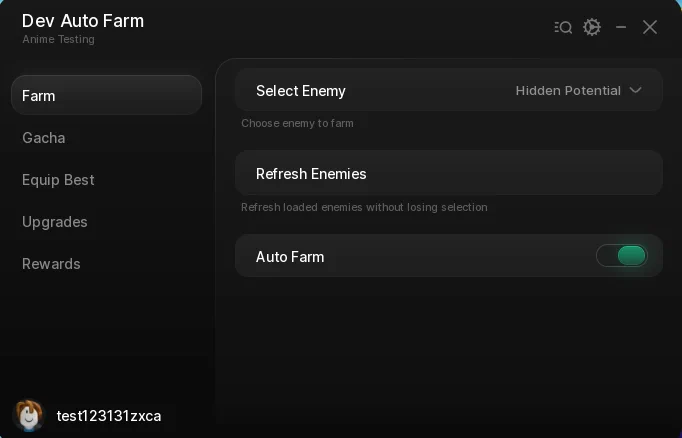
Looking for an Anime Breaker script that fights for you? This one puts the whole grind on toggles across five tabs — Auto Farm locks onto the enemy type you pick, the Gacha tab spins pets and races for you, Equip Best keeps your loadout current and Upgrades spends the resources — with Auto Rank Up and reward claims on top.
Anime Breaker is a Roblox game where you tap for energy, open cards for companions, fight enemies across anime worlds to earn resources, and rank up to unlock avatars, weapons and rarer drops.
Below you can review the available functions, learn what each option does, and find basic usage information.
Anime Breaker Script Features
- Auto Farm — Teleports you onto the nearest enemy of the type you selected and holds you there until it dies, then moves to the next one. Turning it off stops your character dead rather than leaving it drifting.
- Select Enemy — A dropdown built from the enemies actually loaded in your server, so it only lists what you can reach. Refresh Enemies re-reads the list without losing your selection.
- Auto Open Pet Gacha — Spins the pet gacha on a loop for the world you pick — DBZ, AOT, Naruto or Nanatsu.
- Auto Spin Race — Keeps rolling the race spin so you are not stuck with the first one you got.
- Auto Equip Best — Four separate toggles — Pets, Avatars, Accessories and Weapons — each calling the game's own Equip Best for that slot, so whatever you just pulled is on immediately.
- Auto Upgrade Energy, Damage, Gold and Attack Range — One toggle per stat on the Upgrades tab, each buying its upgrade on a loop as the resources come in.
- Auto Rank Up — Ranks you up the moment the requirement is met instead of waiting for you to notice the button.
- Auto Claim Time Rewards and Achievements — Collects both reward sets on a loop from the Rewards tab, so nothing sits unclaimed.
- Keyless — No key system, no shortlink and no whitelist — paste the loadstring and the menu opens.
Written in-house rather than mirrored from another developer — the loader is hosted on the ScriptsRBX GitHub. Join the Discord for updates: discord.gg/nXe86GVv9x
Download Anime Breaker Script:
1Last checked: September 14, 2026 on the Delta executor — script attached and the menu loaded. Game updates can break scripts at any time; the developer's Discord above usually has the newest version.
How To Use The Anime Breaker Script
- Open Roblox and launch Anime Breaker.
- Start your preferred Roblox executor.
- Copy the Anime Breaker script.
- Paste the script into your executor.
- Execute the script.
- On the Farm tab pick an enemy in Select Enemy and switch on Auto Farm, then open Equip Best and turn on all four toggles.
Menu Layout
The menu is a Rayfield window — it is titled Dev Auto Farm with the subtitle Anime Testing, which is just the name left in the build, not a different script — with five tabs down the side.
Farm has Select Enemy, Refresh Enemies and Auto Farm. Gacha has the Gacha World dropdown, Auto Open Pet Gacha and Auto Spin Race. Equip Best is four toggles, one each for Pets, Avatars, Accessories and Weapons. Upgrades has Auto Upgrade Energy, Damage, Gold and Attack Range plus Auto Rank Up. Rewards has Auto Claim Time Rewards and Auto Claim Achievements.
How Auto Farm Picks Its Target
Select Enemy is filled from the enemies currently loaded in your server, one entry per enemy name, so a mob that is not in your world is not in the list. If you move zones, press Refresh Enemies and it re-reads without dropping the one you had picked.
With Auto Farm on, every frame it checks whether your current target is still alive. If it is, you stay glued to it; if not, it finds the closest enemy of the selected name and teleports you onto that one. The game's own attack handles the damage — the script only keeps you in range.
Switching Auto Farm off also zeroes your character's velocity, so you do not carry on sliding after the teleporting stops.
Anime Breaker Script FAQ
Is the Anime Breaker script keyless?
Why is the menu called Dev Auto Farm?
Why is my enemy not in the Select Enemy list?
Which gacha worlds does it support?
Which executor should I use?
More Roblox Scripts
![[RELEASE] MUGEN Script (2026) – Auto Farm, Auto Skills, Auto Respawn & More!](https://tr.rbxcdn.com/180DAY-ed94ca22c209afbccb4d35f4a5423084/768/432/Image/Webp/noFilter) [RELEASE] MUGEN Script (2026) – Auto Farm, Auto Skills, Auto Respawn & More!
[RELEASE] MUGEN Script (2026) – Auto Farm, Auto Skills, Auto Respawn & More!
![[NEW] Cage Fishing Script 🐟 Auto Collect Cages, Instant Sell & Infinite Money!](https://tr.rbxcdn.com/180DAY-13c6a9e88872641ed07ce41e83b2e4b2/768/432/Image/Webp/noFilter) [NEW] Cage Fishing Script 🐟 Auto Collect Cages, Instant Sell & Infinite Money!
[NEW] Cage Fishing Script 🐟 Auto Collect Cages, Instant Sell & Infinite Money!
 KAIZEN Roblox Script 2026 – Keyless Auto Farm Kill Aura
 Arsenal Script Keyless
 NEW Volleyball Legends Script (2026) – Infinite Spins, Auto Play & More OP Features!
![[King & Monarch Update 2026] Sailor Piece Roblox Script – Keyless Auto Farm, Kill Aura & Boss Farm](https://tr.rbxcdn.com/180DAY-765ba46a4afd7f0168a1932ddfbc26e8/768/432/Image/Webp/noFilter) [King & Monarch Update 2026] Sailor Piece Roblox Script – Keyless Auto Farm, Kill Aura & Boss Farm
[King & Monarch Update 2026] Sailor Piece Roblox Script – Keyless Auto Farm, Kill Aura & Boss Farm
![[UPDATE 🔪] Forsaken Script – Auto Block, Aimbot & OP PvP GUI (2026)](https://tr.rbxcdn.com/180DAY-ade3a7a657babdc426cad38911362395/768/432/Image/Webp/noFilter) [UPDATE 🔪] Forsaken Script – Auto Block, Aimbot & OP PvP GUI (2026)
[UPDATE 🔪] Forsaken Script – Auto Block, Aimbot & OP PvP GUI (2026)
 +1 Mog Evolution Script – Auto Click, Auto Rebirth & Auto Win
![[❄️WINTER] Jujutsu Infinite Script Keyless Auto Farm level and BOSS!](https://tr.rbxcdn.com/180DAY-decec85a41b80e4ac0beca8bc2952a7f/768/432/Image/Webp/noFilter) [❄️WINTER] Jujutsu Infinite Script Keyless Auto Farm level and BOSS!
[❄️WINTER] Jujutsu Infinite Script Keyless Auto Farm level and BOSS!
![[🦈UPD] Fish It! Script 🐟 No Key – Auto Farm & Instant Catch](https://tr.rbxcdn.com/180DAY-d612acdb03ba6e23e0c637328e22efc1/768/432/Image/Webp/noFilter) [🦈UPD] Fish It! Script 🐟 No Key – Auto Farm & Instant Catch
[🦈UPD] Fish It! Script 🐟 No Key – Auto Farm & Instant Catch
 RoFront Script – Infinite Gold, Instant Win & Unlock All Arsenal
 Plants vs Brainrots Script – AUTO MONEY + KILL AURA + AUTO BUY!