
Run a Christmas Tree Lot Script – Auto Buy Trees, Auto Place, Auto Cashier & Auto Hire Staff
No key needed for this Run a Christmas Tree Lot script. Last checked on the Delta executor: .
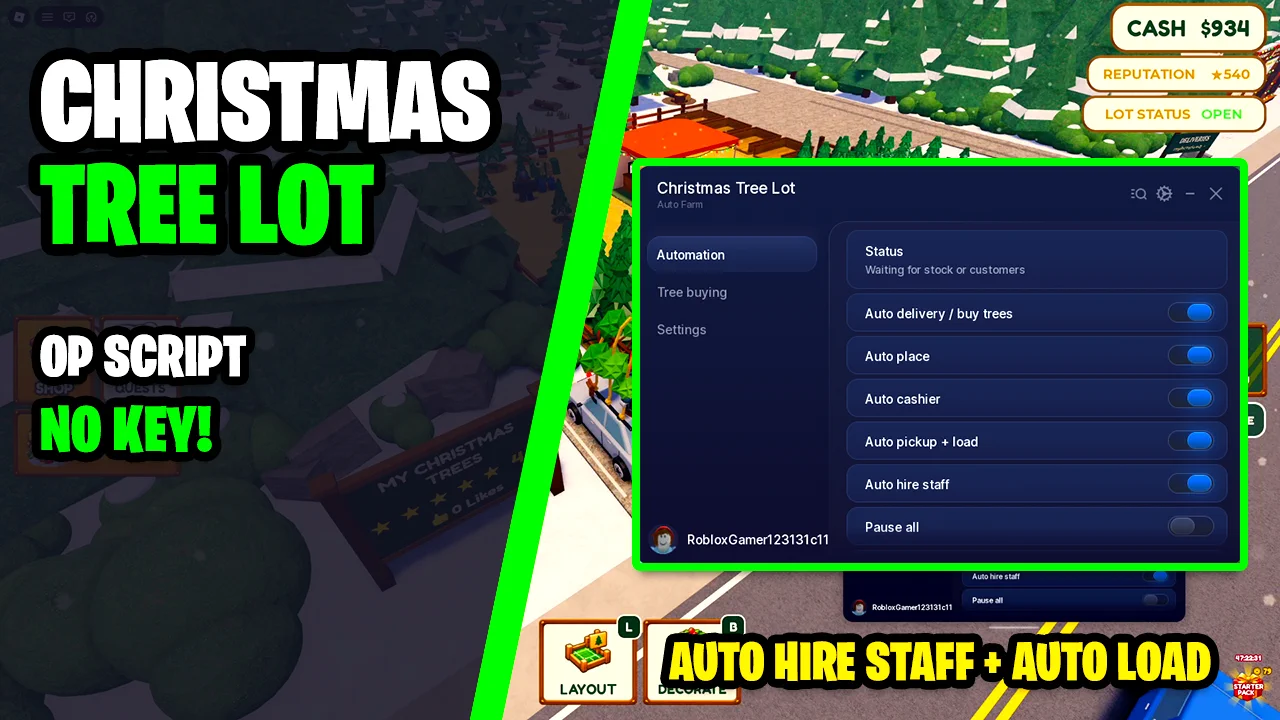
Looking for a Run a Christmas Tree Lot script that runs the lot for you? This keyless ScriptsRBX menu has Auto Delivery to buy trees, Auto Place, Auto Cashier, Auto Pickup + Load and Auto Hire Staff, so trees get ordered, set out, sold and loaded onto customers' cars while you watch the cash go up.
Run a Christmas Tree Lot is a Roblox tycoon where you order trees from a supplier, place them around your lot, help customers pick one, tie it onto their car and ring them up at the cashier. Sales earn cash and reputation, which you spend on more land, decorations and staff.
Run a Christmas Tree Lot Script Features
- Auto Delivery / Buy Trees — Orders trees from the supplier for you, checking every 20 seconds.
- Auto Place — Places delivered trees on your lot so the stock is always out.
- Auto Cashier — Rings up customers at the cashier without you standing there.
- Auto Pickup + Load — Picks up the customer's tree and loads it onto their car.
- Auto Hire Staff — Hires staff for your lot automatically.
- Pause All — Stops every automation at once without turning each toggle off.
- Status Line — Shows what the script is doing right now, such as waiting for stock or customers.
- Prefer Recommended Order — Buys the supplier's live recommended order first.
- Cheapest Fallback — If no recommended trees can be bought, buys affordable unlocked trees by lowest price.
- Cash Reserve — Slider for how much cash to keep unspent; the default is $100.
- Trees Per Order — Slider for the most trees bought in one order; the default is 5.
- Tree Target Limit — Optional cap on trees, counting placed, stored and incoming ones; off by default.
- Buying Status — Explains the last order and why any trees were skipped, such as not enough cash or no space.
- Keyless — No key system or shortlink: paste the loadstring and the menu opens.
Written in-house rather than mirrored from another developer — the loader is hosted on the ScriptsRBX GitHub. Join the Discord for updates: discord.gg/nXe86GVv9x
Download Run a Christmas Tree Lot Script:
1Last checked: November 15, 2026 on the Delta executor — script attached and the menu loaded. Game updates can break scripts at any time; the developer's Discord above usually has the newest version.
How To Use The Run a Christmas Tree Lot Script
- Open Roblox and launch Run a Christmas Tree Lot.
- Start your preferred Roblox executor.
- Copy the Run a Christmas Tree Lot script.
- Paste the script into your executor.
- Execute the script.
- On the Automation tab turn on Auto delivery / buy trees, Auto place, Auto cashier, Auto pickup + load and Auto hire staff, then set your cash reserve on the Tree buying tab.
How Auto Buying Works
Every 20 seconds Auto Delivery checks the supplier and buys its live recommended order first. The order is trimmed to your Cash Reserve, the Trees Per Order limit, the supplier's stock and the space you have to receive trees. If nothing recommended can be bought, Cheapest Fallback picks affordable unlocked trees by lowest price instead.
Turn on Use tree target limit if you only want a set number of trees on the lot. It counts trees that are placed, stored and still on the way, and the Buying status box tells you why an order was skipped.
Run a Christmas Tree Lot Script FAQ
Is the Run a Christmas Tree Lot script keyless?
Will the script spend all my cash on trees?
Why is the script not buying trees?
More Roblox Scripts
 Roblox Fisch Script – Get Infinite Fish, Auto Catch & Instant Farm (2026)
 Cut a Rock Script – Auto Farm Best Stage & Auto Sell
 [RELEASE] MUGEN Script (2026) – Auto Farm, Auto Skills, Auto Respawn & More!
 NEW Volleyball Legends Script (2026) – Infinite Spins, Auto Play & More OP Features!
 Pets Universe Script – Auto Farm, Auto Hatch, Auto Upgrades & Auto Potions
 Dead Rails Script – 3 Working Hubs (Auto Bond, Auto Win, Infinite Bonds)
 UPDATE Blue Lock Rivals Script Unlock Don Lorenzo, Grillz Explosion Goal Effect
 Prospecting Script (2026) – Auto Farm, Auto Pan, Shake & Sell Fast!
 Fish It Script No Key – Instant Catch & Auto Features
 Ride A Pet Script – 2 Working Hubs: Auto Pick-Up Eggs, Auto Hatch, Server Hop & Egg ESP
 Smoothie Farm Script – Auto Collect, Auto Blend & Auto Slice
[💎UPD] Fish It! Script – Auto Farm, Instant Catch & Fishing