
Smoothie Farm Script – Auto Collect, Auto Blend & Auto Slice
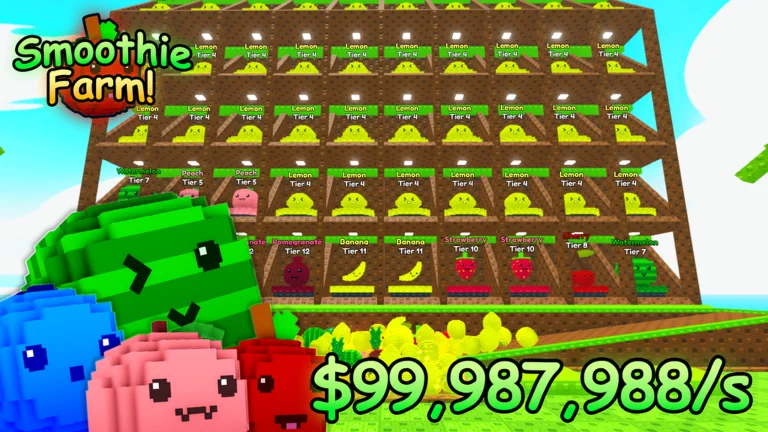
Looking for a Smoothie Farm script that runs the whole plot for you? The menu is called Fruit Automation, and its headline features are Auto Collect Fruit, Auto Blend Fruit, Auto Collect Cash and Auto Slice Fruit — enough to keep a farm producing and selling while you leave it alone.
Smoothie Farm is a Roblox game where you buy fruit, blend it into smoothies, sell the smoothies for cash and build the farm up from there. Your fruit keeps earning while you are offline.
Alongside the farm automation there is a full Fruit Slice section for the minigame — auto slice, auto start, auto claim and a mega-fruit spam — plus Auto Buy at 1, 5, 25 and 100. Below you can review the available functions, learn what each option does, and find basic usage information.
Smoothie Farm Script Features
- Auto Collect Fruit — Pulls ripe fruit on your plot straight to you instead of walking to each one, and only ever touches fruit that belongs to you.
- Auto Collect Cash — Presses your plot's Collect pad on a loop so earnings never sit waiting.
- Auto Blend Fruit — Keeps the blender running, turning collected fruit into smoothies without input.
- Auto Deposit Gems — Deposits gems as they arrive rather than letting them build up uncollected.
- Auto Upgrade Sell — Buys the sell upgrade whenever you can afford it, so your smoothies keep going up in value.
- Auto Buy 1 — Buys single fruit continuously — the cheapest way to keep the plot filled early on.
- Auto Buy 5 — Buys in fives once single purchases stop keeping up.
- Auto Buy 25 — Bulk buying for the mid game, when cash comes in faster than you can spend it.
- Auto Buy 100 — The largest bulk option, for when the farm is earning millions per cycle.
- Auto Slice Fruit — Plays the Fruit Slice minigame for you and deliberately leaves bombs alone.
- Auto Hit Mega Fruit — Spams hits on the mega fruit for the whole time it is on screen.
- Auto Start Round — Starts the next Fruit Slice round as soon as one is available.
- Auto Claim — Claims the reward at the end of a round so nothing is left on the board.
- Detect My Plot — Finds which plot is yours and re-checks it if you change plots mid-session.
- Four Menu Themes — Ember, Frost, Rose and Amethyst, switchable from the Settings tab.
- Keyless — No key system, no shortlink and no whitelist — paste the loadstring and the menu opens.
Written in-house by Ryx rather than mirrored from another developer — the loader is hosted on the ScriptsRBX GitHub. Join the Discord for updates: discord.gg/nXe86GVv9x
Download Smoothie Farm Script:
1Last checked: September 5, 2026 on the Delta executor — script attached and the menu loaded. Game updates can break scripts at any time; the developer's Discord above usually has the newest version.
How To Use The Smoothie Farm Script
- Open Roblox and launch Smoothie Farm.
- Start your preferred Roblox executor.
- Copy the Smoothie Farm script.
- Paste the script into your executor.
- Execute the script.
- Open the Automation tab, switch on Auto Collect Fruit and Auto Blend Fruit, and leave the farm running.
Smoothie Farm Script Showcase
Want to see the automation running before you use it? The full showcase is on YouTube: Smoothie Farm Script – Auto Collect Fruit, Auto Blend Fruit, Auto Collect Cash (Keyless).

The video runs through the Fruit Automation menu as it appears above — the plot toggles collecting and blending on their own, the Auto Buy sizes keeping the farm stocked, and the Fruit Slice minigame playing itself.
Menu Layout
The hub is called Fruit Automation and splits into three tabs. Automation holds the plot toggles: Auto Collect Fruit, Auto Collect Cash, Auto Blend Fruit, Auto Deposit Gems, Auto Upgrade Sell and the four Auto Buy sizes.
Fruit Slice covers the minigame — Auto Slice Fruit, Auto Hit Mega Fruit, Auto Start Round and Auto Claim. Settings holds the Detect My Plot button and the four themes.
How The Plot Automation Works
Every action on your plot already has a pad you walk onto — Collect, Blend, Deposit Gems, Upgrade Sell and the four Buy pads. The toggles fire those same pads on a short loop, so the effect is identical to standing on them, except you can be anywhere on the map while it happens.
Auto Collect Fruit works differently. Instead of pressing a pad it brings each ripe fruit to you, and it checks ownership first, so it only ever moves fruit on your own plot and never touches another player's farm.
The Fruit Slice Minigame
Auto Slice Fruit reads what is on the board and slices it, skipping bombs on purpose rather than hitting everything in range. Auto Hit Mega Fruit is a separate toggle because the mega fruit rewards repeated hits for as long as it stays up.
Pair Auto Start Round with Auto Claim and the minigame loops on its own: it starts, plays, claims, and starts again.
Smoothie Farm Script FAQ
Is the Smoothie Farm script keyless?
Does Auto Collect Fruit take other players' fruit?
Which Auto Buy should I use?
Does Auto Slice hit the bombs?
Which executor should I use?
More Roblox Scripts
 Defeat Anime RNG Script – Auto Roll, Auto Farm Waves, Auto Upgrade & Infinite Tower
![[UPD] Blue Lock: Rivals Script Free Script – Auto Goal, Teleport, Infinite Stamina & More!](https://tr.rbxcdn.com/180DAY-809ffd9f8bec2baf4e92c52e40e505b4/768/432/Image/Webp/noFilter) [UPD] Blue Lock: Rivals Script Free Script – Auto Goal, Teleport, Infinite Stamina & More!
[UPD] Blue Lock: Rivals Script Free Script – Auto Goal, Teleport, Infinite Stamina & More!
![[RELEASE] Jujutsu Infinite Script – Auto farm & Quest! Instant kill, Infinite Skills](https://tr.rbxcdn.com/180DAY-decec85a41b80e4ac0beca8bc2952a7f/768/432/Image/Webp/noFilter) [RELEASE] Jujutsu Infinite Script – Auto farm & Quest! Instant kill, Infinite Skills
[RELEASE] Jujutsu Infinite Script – Auto farm & Quest! Instant kill, Infinite Skills
 Steal An Anime Egg Script – Auto Farm Selected Rarity, Teleport + Claim & Auto Step Boost
 Stream A Cheese Pull Script – Auto Stream, Crates, Rebirth & Fly
 Roblox Grow a Garden Script – Auto Farm, Infinite Seeds & Boosts (2026)
![[RELEASE] MUGEN Script (2026) – Auto Farm, Auto Skills, Auto Respawn & More!](https://tr.rbxcdn.com/180DAY-ed94ca22c209afbccb4d35f4a5423084/768/432/Image/Webp/noFilter) [RELEASE] MUGEN Script (2026) – Auto Farm, Auto Skills, Auto Respawn & More!
[RELEASE] MUGEN Script (2026) – Auto Farm, Auto Skills, Auto Respawn & More!
![[💎UPD] Fish It! Script – Auto Farm, Instant Catch & Fishing](https://tr.rbxcdn.com/180DAY-d612acdb03ba6e23e0c637328e22efc1/768/432/Image/Webp/noFilter) [💎UPD] Fish It! Script – Auto Farm, Instant Catch & Fishing
[💎UPD] Fish It! Script – Auto Farm, Instant Catch & Fishing
 Flatten The Mountain Script – Auto Mine, Auto Upgrade, Damage & Hit Delay
 Steal Animal Egg Script – Auto Farm Eggs, Rarity Filter, Egg Teleport & Walk Speed
 Build the Pyramid Script – Auto Farm Blocks, Auto Place & Auto Upgrades
![[NEW] Hypershot Gunfight Script – Silent Aimbot, ESP, Triggerbot & More! (2026)](https://tr.rbxcdn.com/180DAY-862832bec03c9bf80435f973aec4112a/768/432/Image/Webp/noFilter) [NEW] Hypershot Gunfight Script – Silent Aimbot, ESP, Triggerbot & More! (2026)
[NEW] Hypershot Gunfight Script – Silent Aimbot, ESP, Triggerbot & More! (2026)