
Build the Pyramid Script – Auto Farm Blocks, Auto Place & Auto Upgrades
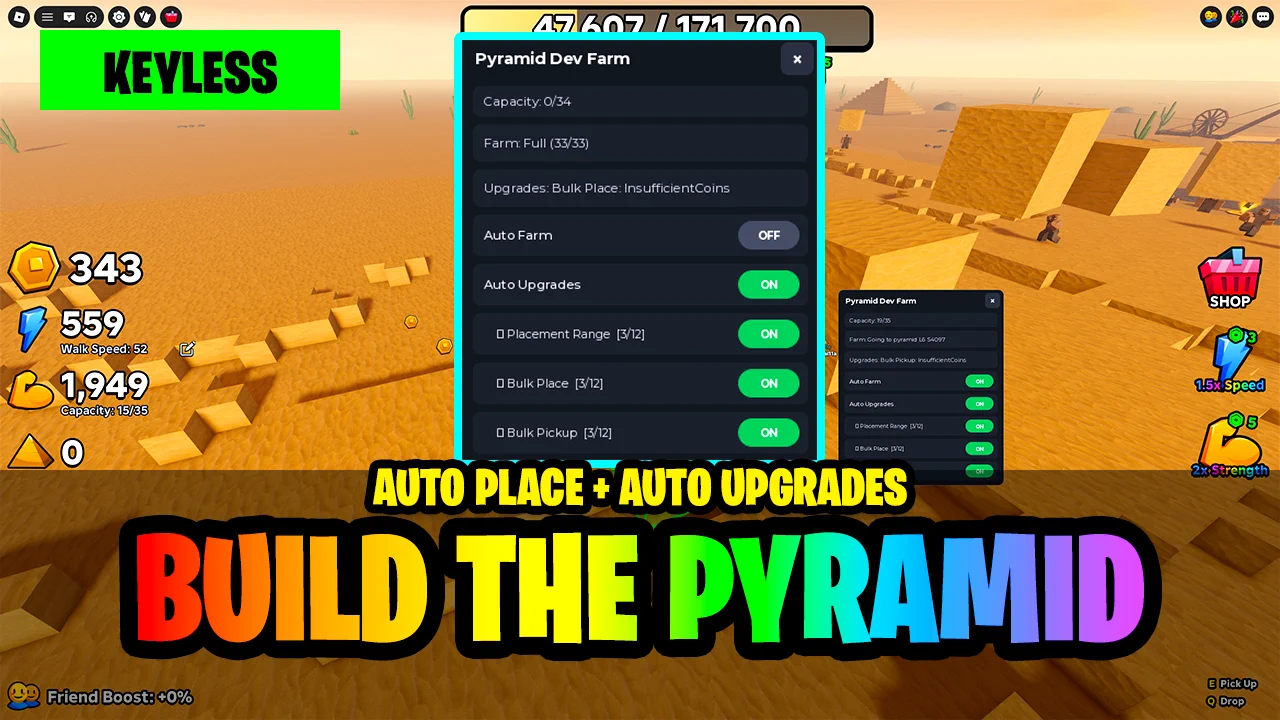
Looking for a Build the Pyramid script that hauls the blocks for you? This keyless script includes Auto Farm, which picks up blocks at the quarry and places them on the pyramid, plus Auto Upgrades for Placement Range, Bulk Place and Bulk Pickup, so the whole build loop runs from one small menu.
Build the Pyramid is a Roblox game where you carry stone blocks from the quarry to the pyramid, place them layer by layer, and spend your coins on upgrades so you can carry and place more blocks per trip.
Build the Pyramid Script Features
- Auto Farm — Teleports to the quarry, picks up blocks until you are full, then teleports to the pyramid and places them, over and over.
- Capacity Aware — Reads your Capacity counter, so every trip leaves the quarry full and comes back empty.
- Smart Placement — Asks the game for the nearest free slot on the current layer, so blocks always go where they are allowed.
- Bulk Place Support — Once Bulk Place is upgraded, it fills several nearby slots in one go.
- Auto Upgrades — Buys upgrades for you whenever you can afford them.
- Choose Your Upgrades — Separate toggles for Placement Range, Bulk Place and Bulk Pickup, each showing its level, like 3/12.
- Stops at Max — Each upgrade stops being bought once it reaches its max level.
- Live Status — Shows your capacity, what Auto Farm is doing and the last upgrade result.
- Everything Starts Off — All toggles start OFF, and the close button stops every loop at once.
- Keyless — No key system, shortlink or whitelist: paste the loadstring and the menu opens.
Written in-house rather than mirrored from another developer — the loader is hosted on the ScriptsRBX GitHub. Join the Discord for updates: discord.gg/nXe86GVv9x
Download Build the Pyramid Script:
1Last checked: October 2, 2026 on the Delta executor — script attached and the menu loaded. Game updates can break scripts at any time; the developer's Discord above usually has the newest version.
How To Use The Build the Pyramid Script
- Open Roblox and launch Build the Pyramid.
- Start your preferred Roblox executor.
- Copy the Build the Pyramid script.
- Paste the script into your executor.
- Execute the script.
- Turn on Auto Farm, then turn on Auto Upgrades and pick which upgrades it should buy.
How The Block Loop Works
Auto Farm runs the whole trip. It reads your Capacity counter, teleports you to the quarry and picks up blocks until you are full. Then it teleports you to the pyramid, asks the game for the nearest free slot on the current layer and places your blocks there until you are empty, and starts the next trip.
Coins from building go into Auto Upgrades. Turn on the ones you want, Placement Range, Bulk Place and Bulk Pickup, and each is bought as soon as you can afford the next level, up to its max. With Bulk Place upgraded, Auto Farm fills several nearby slots per placement, so each trip gets faster.
Build the Pyramid Script FAQ
Is the Build the Pyramid script keyless?
Why does the Upgrades line say InsufficientCoins?
Why is nothing happening after I run it?
More Roblox Scripts
![[UPD] Blue Lock: Rivals Script Free Script – Auto Goal, Teleport, Infinite Stamina & More!](https://tr.rbxcdn.com/180DAY-809ffd9f8bec2baf4e92c52e40e505b4/768/432/Image/Webp/noFilter) [UPD] Blue Lock: Rivals Script Free Script – Auto Goal, Teleport, Infinite Stamina & More!
[UPD] Blue Lock: Rivals Script Free Script – Auto Goal, Teleport, Infinite Stamina & More!
 Garden Tower Defense Script – Auto Win & Farm Roblox
 OP 99 Nights in the Forest Script – Bring All, Auto Win + Kill Aura (NO KEY!)
 Survive LAVA for Brainrots Script Infinite Jumps & God Mode
 Bike For Egg Script – Auto Farm Eggs, WalkSpeed & JumpPower
 Arsenal Script Keyless
![[💎UPD] Fish It! Script – Auto Farm, Instant Catch & Fishing](https://tr.rbxcdn.com/180DAY-d612acdb03ba6e23e0c637328e22efc1/768/432/Image/Webp/noFilter) [💎UPD] Fish It! Script – Auto Farm, Instant Catch & Fishing
[💎UPD] Fish It! Script – Auto Farm, Instant Catch & Fishing
 Run For Brainrots Script – Instant Get CELESTIAL Script (2026)
 Merge & Dig Simulator Script – Auto Merge, Auto Buy Pickaxe, Auto Upgrades & Auto Egg
 Slayers 2 Script – Two Hubs: Auto Farm Quests, Auto Boss, Auto Parry & NPC ESP
 Steal a Brainrot Script – 7 Working Keyless Hubs (Auto Steal, Instant Steal, NoClip)
 Harpoon a Fish Script – Auto Harpoon, Auto Dive, Auto Feed Fish & Auto Open Crates