
Slayers 2 Script – Two Hubs: Auto Farm Quests, Auto Boss, Auto Parry & NPC ESP
Looking for a Slayers 2 script? There are two on this page, both keyless. The newest and by far the bigger is the Ouroboros Hub: Auto Farm Quests, Auto Farm Mob, Auto Boss, Auto Parry V5, Fast Kill Aura, Auto Level, Auto Skill Tree and Auto Fishing, with ESP for mobs, bosses, chests and players and Discord webhooks on top.
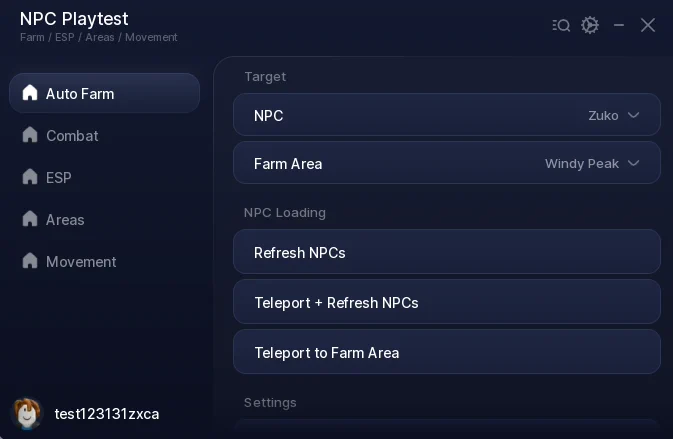
Under it is a compact in-house build, NPC Playtest, which hovers you over the NPC you pick and hits it — Auto Farm, Auto Melee, Auto Block, NPC ESP, area teleports, Speed and Fly across five tabs.
Slayers 2 is a Roblox anime fighting game where you travel between regions like Bamboo Grove, Butterfly Estate and Hidden Mist Village, fight demons and other NPCs, and level through the slayer ranks.
Below you can review the available functions, learn what each option does, and find basic usage information.
Slayers 2 Script Features
- Auto Farm Quests — Takes and farms quests from a Select Quests list, with Refresh Quests and Abandon Quest buttons and a status line saying what it is fighting.
- Auto Farm Mob — Farms a mob you pick from a Select Mob list instead of following the quest board.
- Auto Boss and Auto Boss Hunts — Select Bosses and Hunt Tiers, then it travels to them and fights on a loop, including the hunt board.
- Auto Parry V5 — Parries mobs and players inside a Parry Range with adjustable Parry Timing, and blocks when parry is locked out.
- Fast Kill Aura — Damages everything in range, with Aura Height and Aura Speed sliders. Instant Kill sits alongside it.
- Auto Level and Auto Skill Tree — Levels you, then spends the points — Select Nodes and Unlock Skills work through the tree on their own.
- Auto Skills and Auto Breathing — Fires your equipped skills on cooldown, with a Select Breathing dropdown for the style to use.
- Auto Potion — Drinks a health or stamina potion below the threshold you set, from a Select Potion list.
- Auto Fishing — Fishes with Auto Buy Bait and Auto Sell, so a rod run needs nothing from you.
- Dungeon Run — Auto Queue, Auto Ready Up, Auto Pick Cards and Auto Skip Waves for dungeon floors.
- Auto Claim Souls, Chests and Loot — Auto Claim Souls, Auto Open Chest, Auto Loot and Auto Sealed Cache pick up everything the farm drops.
- Redeem All Codes — Runs every current code in one press.
- ESP — Mob, Boss, NPC, Player, Chest, Muzan, Spider Lily, Wild Horse and Lever ESP, each toggled separately.
- Notifications and Webhooks — Pings on Boss Spawns, Muzan, Black Marketer, Tailor Restocks and Final Selection, and posts the same to a Discord Webhook URL.
- Movement and Utility — Speed, Fly, Double Jump, High Jump, Wall Climb, Infinite Climb, Infinite Stamina, Infinite Horse Stamina, No Drown, No Ragdoll, No Stun, No Sun Damage, No Dash Cooldown, FPS Boost and Auto Reconnect on Kick.
- Keyless — Neither script has a key system, shortlink or whitelist — paste the loadstring and the menu opens.
Written in-house rather than mirrored from another developer — the loader is hosted on the ScriptsRBX GitHub. Join the Discord for updates: discord.gg/nXe86GVv9x
1. Ouroboros Hub – Auto Farm Quests, Auto Boss, Auto Parry V5 and More
1Last checked: September 22, 2026 on the Delta executor — script attached and the menu loaded. Game updates can break scripts at any time; the developer's Discord above usually has the newest version.
How To Use The Slayers 2 Script
- Open Roblox and launch Slayers 2.
- Start your preferred Roblox executor.
- Copy the script you want from this page.
- Paste the script into your executor.
- Execute the script.
- On Ouroboros: open Farming, switch on Auto Level and Auto Farm Quests, then add Auto Parry V5 from the combat group.
2. NPC Playtest – Auto Farm, Auto Melee, NPC ESP, Area Teleport and Fly
The second script is a small in-house build. It does one thing well: pick an NPC and an area, and it teleports to that area's spawn crystal, hovers you a few studs above the nearest matching NPC, and re-targets the moment that one dies.
Five tabs. Auto Farm has the NPC dropdown (Nearest Active NPC, Bandit, Civilian, Zuko), the Farm Area dropdown, Height Above NPC and Target Range sliders, and refresh and teleport buttons. Combat has Auto Melee with a speed slider, Only While Near Farm Target, and Auto Block. ESP highlights every live NPC in every region with a name and distance, hostiles red and civilians blue, plus stationary NPCs in purple. Areas teleports to any region with a spawn crystal. Movement has Speed and Fly.
Unlike Ouroboros this one is fully readable, so every control above was verified line by line rather than from menu labels.
1Ouroboros Hub: How The Farming Group Works
Auto Farm Quests is the one to start with. Pick entries in Select Quests and it takes them, travels, fights, and hands them in, with a status line underneath saying what it is fighting right now and a Quest Progress panel showing the quest, the count and the breathing cost.
Auto Farm Mob ignores the quest board and grinds a mob from Select Mob instead, which is the better choice when you want a specific drop. Auto Boss and Auto Boss Hunts work the same way off Select Bosses and Hunt Tiers.
Leave Auto Level on underneath all of it and pair it with Auto Skill Tree, and the points you earn get spent as they arrive instead of sitting unused.
Ouroboros Hub: Parry, Kill Aura And Potions
Auto Parry V5 is the part that keeps the farm alive. It parries mobs and players inside a Parry Range you set, with Parry Timing to tune how early it fires, and it falls back to blocking while parry is locked out.
Fast Kill Aura handles the damage, with Aura Height and Aura Speed to shape the area it hits. Auto Potion watches your health and drinks below the threshold you choose, so a long unattended farm does not end on one bad pull.
NPC Playtest: Auto Farm And Auto Melee Work Together
On the in-house script, Auto Farm only moves you. It sets your position to the target plus your chosen height every frame, facing it, with your velocity zeroed so you do not drift. Auto Melee is what does the damage.
With Only While Near Farm Target left on, Auto Melee fires only while Auto Farm has you within 8 studs of a live target, so it is not swinging at air between kills. Speed and Fly both pause themselves while Auto Farm is running so they do not fight over your position.
What The Ouroboros Loader Does
The first loadstring is the Ouroboros loader, not the script. It reads the game's creator id, looks it up in a table of around two hundred games, and loadstrings the matching file from the same GitHub — for Slayers 2 that is a 2.5 MB obfuscated file. The loader itself is readable and has no key step; the game file cannot be read, so the Ouroboros features above are described from the menu labels and readouts rather than the code.
The loader also refuses to run on Solara and Xeno and shows an unsupported-executor screen instead. Use a different executor for that one. The in-house script has no such restriction.
Slayers 2 Script FAQ
Which of the two Slayers 2 scripts should I use?
Are the Slayers 2 scripts keyless?
Why does Ouroboros say my executor is unsupported?
Auto Farm is on but I am just hovering?
Why is Speed or Fly not working?
More Roblox Scripts
 Steel Fighters Script – Auto Farm Fights, Auto Roll Robots, Auto Collect Junk & Auto Rebirth
 Make Rugs Script – Auto Make Rug, Auto Sell To Customers, Auto Roll Yarn & Auto Hire
 Ride a Dino Script – Auto Tame Dinos, Auto Sell, Auto Equip Best & Dino ESP
 Harpoon a Fish Script – Auto Harpoon, Auto Dive, Auto Feed Fish & Auto Open Crates
 Climb For Animals Eggs Script – Auto Steal Eggs, Auto Hatch, Teleport to Zone & Auto Rebirth
 Anime Zero Script – Auto Farm, Auto Skills, Auto Join & Auto Skill Tree
![[🎃HALLOWEEN UPDATE] MM2 Script – AUTO FARM CANDY, GODMODE & INFINITE COINS (NO KEY 2026)](https://tr.rbxcdn.com/180DAY-fe7335c3ad752e84323cd81ae38de69a/768/432/Image/Webp/noFilter) [🎃HALLOWEEN UPDATE] MM2 Script – AUTO FARM CANDY, GODMODE & INFINITE COINS (NO KEY 2026)
[🎃HALLOWEEN UPDATE] MM2 Script – AUTO FARM CANDY, GODMODE & INFINITE COINS (NO KEY 2026)
![[🌋] Build An Island Script 2026 – Auto Farm Infinite Coins, Auto Craft + More!](https://tr.rbxcdn.com/180DAY-e1a97a5129df37ed6433421b3118cb0f/768/432/Image/Webp/noFilter) [🌋] Build An Island Script 2026 – Auto Farm Infinite Coins, Auto Craft + More!
[🌋] Build An Island Script 2026 – Auto Farm Infinite Coins, Auto Craft + More!
![🔦 99 Nights in the Forest Script [CLASSES] – Auto Win, Find Lost Children, TP & More!](https://tr.rbxcdn.com/180DAY-c5215eabc21f46723f0084f99bb7622c/768/432/Image/Webp/noFilter) 🔦 99 Nights in the Forest Script [CLASSES] – Auto Win, Find Lost Children, TP & More!
🔦 99 Nights in the Forest Script [CLASSES] – Auto Win, Find Lost Children, TP & More!
![Find the Brainrot [278] Script 🧠 AUTO FIND + AUTO FARM ALL BRAINROTS](https://tr.rbxcdn.com/180DAY-06d73fcceeedc1972e5995e1ff05c82d/768/432/Image/Webp/noFilter) Find the Brainrot [278] Script 🧠 AUTO FIND + AUTO FARM ALL BRAINROTS
Find the Brainrot [278] Script 🧠 AUTO FIND + AUTO FARM ALL BRAINROTS
 Tap Simulator Reborn Script – Auto Tap, Auto Hatch, Auto Rebirth & Auto Potions
 +1 Mog Evolution Script – Auto Click, Auto Rebirth & Auto Win