
RIVALS Script – Aimbot, ESP, Team Check & FOV
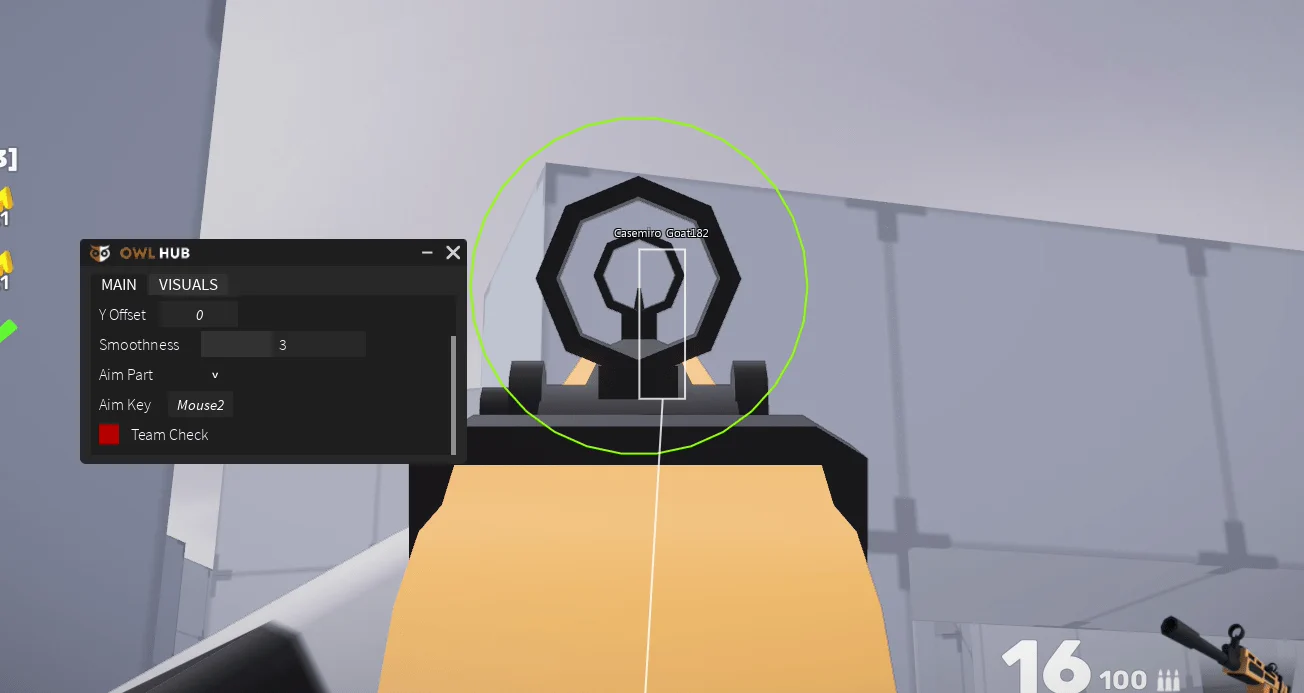
Looking for a RIVALS script? OwlHub gives you an Aimbot with a choice of aim part, ESP through walls, Team Check and an adjustable FOV. It is a universal shooter hub, so the same loader also works in Arsenal, Counter Blox, Big Paintball and Strucid.
RIVALS is a Roblox first-person shooter where you pick a loadout and fight 1v1 or in small teams across short rounds, unlocking new weapons, skins and finishers as you win.
RIVALS Script Features
- Aimbot — Pulls your crosshair onto enemies.
- Aim Part — Aim at the head, the torso or a random part.
- Team Check — Stops the aimbot from targeting your own team.
- ESP — Shows opponents through walls.
- FOV — Sets how wide a circle the aimbot reacts to.
Hub 1 is OwlHub (by Google Chrome and CriShoux): discord.gg/FJmaX4X. All credit goes to the developers.
1. OwlHub – Aimbot, ESP, Team Check and FOV
1How To Use The RIVALS Script
- Open Roblox and launch RIVALS.
- Start your preferred Roblox executor.
- Copy the RIVALS script.
- Paste the script into your executor.
- Execute the script.
- Turn on the features you want in the menu that opens.
OwlHub: What It Does
OwlHub's Aimbot locks onto enemies with the Aim Part you choose, Team Check keeps it off your teammates and the FOV setting limits how far it reaches. ESP shows everyone through walls. The developers warn that it can get accounts banned in RIVALS, so use an alt.
RIVALS Script FAQ
Can the RIVALS script get me banned?
Does this script work in other games?
More Roblox Scripts
 Weak Legacy 2 Script – Auto Farm, Kill Aura, Auto Quest & Auto Breathing
 [❄️WINTER] Jujutsu Infinite Script Keyless Auto Farm level and BOSS!
 Net a Fish Script – Auto Catch Fish, Auto Upgrade, Auto Rebirth & Auto Shoot Megalodon
 Bee Swarm Simulator Script – Auto Farm, Auto Quest, Auto Combat & Auto Planters
 Free Fisch script Max LEVEL NO Key FASTEST AUTO FISH, PERFECT CATCH, Auto Farm
 Grow a Garden Script – Auto Plant, Auto Farm, Auto Sell & Auto Buy
 Jujutsu Infinite Script – Auto Farm Level, Auto Boss Farm, Mob & Mission Farm
 Anime Eternal Script – Fast Kill Aura, Auto Raid, Auto Dungeon & Auto Hatch
 Ride A Pet Script – 2 Working Hubs: Auto Pick-Up Eggs, Auto Hatch, Server Hop & Egg ESP
 Roblox Forsaken Script (2026) – Auto Farm, Auto Complete Generators, AFK Farm, Kill Eliminate & More!
 Dig Script – Auto Dig, Auto Minigame, Dig Anywhere & Auto Sell
 [RELEASE] Blue Heater 2 Script Auto Dungeon, Auto Tower + Auto Farm!