
Anime Zero Script – Auto Farm, Auto Skills, Auto Join & Auto Skill Tree
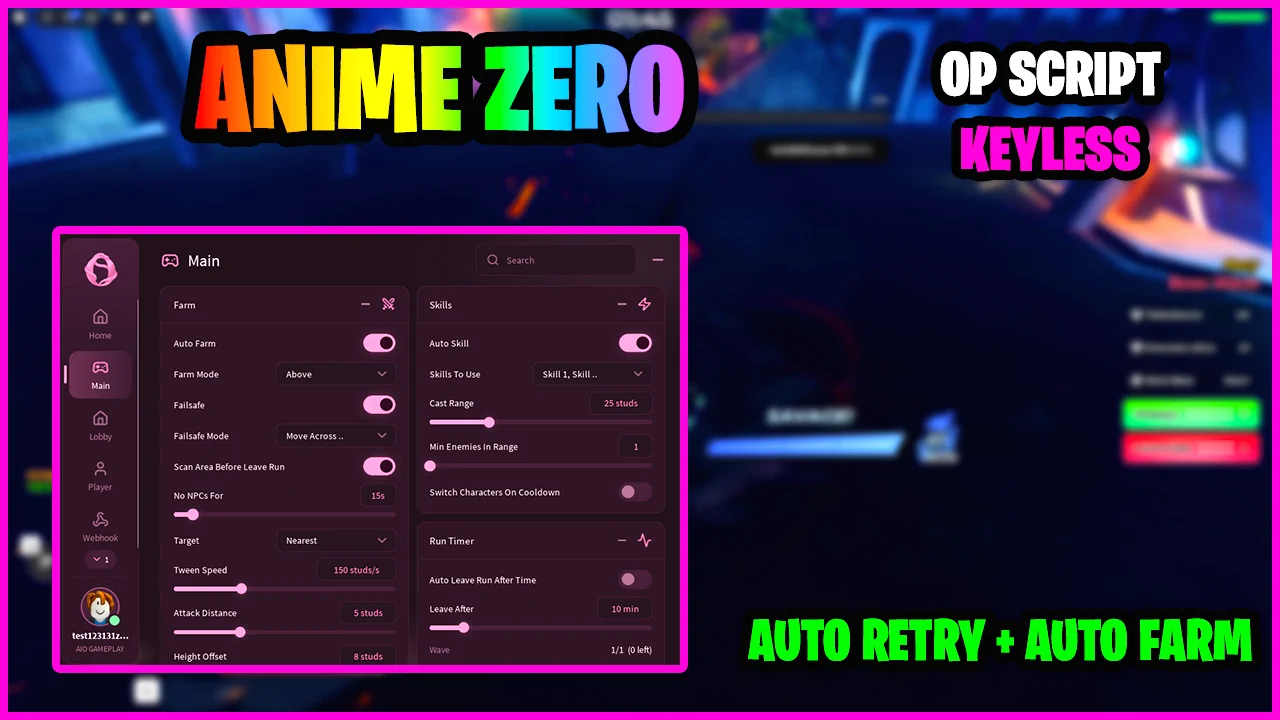
Looking for an Anime Zero script that clears runs for you? This keyless Ouroboros script includes Auto Farm, Auto Skills with ultimates saved for bosses, Auto Join for Infinite mode and Auto Skill Tree, so farming, queueing and upgrading your characters all run from one menu.
Anime Zero is a Roblox anime dungeon crawler RPG where you fight through waves of enemies and bosses, including an Infinite mode with a boss every few waves, and upgrade characters like Goku and Alucard along the way. The game is still in active development, so features and balance can change between updates.
Anime Zero Script Features
- Auto Farm — Moves to enemies and attacks them for you, positioned Above them at the Distance and Height you set, such as 5 and 8 studs.
- Target & Orbit Speed — Goes for the Nearest enemy first and circles it at the Orbit Speed you set, like 180 deg/s.
- Auto Skills — Casts the skills you pick from the Skills list, Skill 1, Skill 2 and more.
- Ultimate On Bosses — Ultimate On Bosses Only and Prioritize Ultimate On Bosses save your ultimate for boss waves.
- Auto Dodge Igris (Beta) — A beta toggle that dodges Igris's attacks for you.
- Switch Character On Cooldown — Swaps to another character while your skills recharge, with a Switch Logic setting for ultimates.
- Retreat To Heal — Flies up when your HP drops below 30% and comes back to fight at 70%, both adjustable.
- Skill Options — Set the Cast Range, such as 25 studs, and the minimum number of enemies in range before a skill is used.
- Auto Join — Queues you into the Mode, Chapter and Difficulty you pick, such as Infinite in the ZZZ World.
- Join Settings — Max Players, Friends Only and a Join Delay of 5 seconds, plus a Leave Queue button.
- Auto Skill Tree — Spends skill tree points on the characters and branches you choose, like ATK and CRIT, up to Max Tier 5.
- Auto Evolve Equipped — Evolves your equipped character when it can.
- Auto Craft Accessories — Crafts the accessories you pick, or all of them, until you own the number you set.
- Auto Claim Rewards — Claims your daily reward, quests, achievements and milestones without opening the menus.
- Auto Redeem Codes — Redeems game codes for you, with a Redeem All Codes button and Auto Skip Tutorial for new accounts.
- Home Stats — The Home tab shows your FPS, ping, players in the server and session time.
Credits go to Ouroboros for making this script — join their Discord to get the updates: discord.gg/synapsex
Download Anime Zero Script:
12Last checked: October 9, 2026 on the Delta executor — script attached and the menu loaded. Game updates can break scripts at any time; the developer's Discord above usually has the newest version.
How To Use The Anime Zero Script
- Open Roblox and launch Anime Zero.
- Start your preferred Roblox executor.
- Copy the Anime Zero script.
- Paste the script into your executor.
- Execute the script.
- Set a Mode on the Joiner tab and turn on Auto Join, then turn on Auto Farm and Auto Skills on the Main tab once the run starts.
How The Anime Zero Farm Works
Auto Join on the Joiner tab puts you in the queue for the mode you picked, such as Infinite in the ZZZ World. Once the run starts, Auto Farm takes you to the Nearest enemy and Auto Skills fires your skills whenever enough enemies are inside the Cast Range.
With Ultimate On Bosses Only turned on, your ultimate is held back for the boss waves instead of being spent on regular enemies. If your HP drops below the Retreat Below HP value, Retreat To Heal flies you up and brings you back once you reach the Back To Fight At HP value.
Between runs, the Prog tab handles upgrades. Auto Skill Tree spends points on the characters and branches you selected, Auto Evolve Equipped evolves your current character, and the Rewards section claims daily rewards, quests, achievements, milestones and codes.
Anime Zero Script FAQ
Is the Anime Zero script keyless?
Can the Anime Zero script farm Infinite mode?
Why does my character keep flying up?
More Roblox Scripts
 Steel Fighters Script – Auto Farm Fights, Auto Roll Robots, Auto Collect Junk & Auto Rebirth
 Make Rugs Script – Auto Make Rug, Auto Sell To Customers, Auto Roll Yarn & Auto Hire
 Ride a Dino Script – Auto Tame Dinos, Auto Sell, Auto Equip Best & Dino ESP
 Harpoon a Fish Script – Auto Harpoon, Auto Dive, Auto Feed Fish & Auto Open Crates
 Climb For Animals Eggs Script – Auto Steal Eggs, Auto Hatch, Teleport to Zone & Auto Rebirth
 +1 Assassin Leveling Script – Auto Farm Stage, Auto Train, Auto Farm World Boss & Auto Rebirth
![[RELEASE] Build A Plane Script Infinite Money & More! (2026)](https://tr.rbxcdn.com/180DAY-f2b15fe59c0fe126abae85f6d0966774/768/432/Image/Webp/noFilter) [RELEASE] Build A Plane Script Infinite Money & More! (2026)
[RELEASE] Build A Plane Script Infinite Money & More! (2026)
![[UPD] Blue Lock: Rivals Script Free Script – Auto Goal, Teleport, Infinite Stamina & More!](https://tr.rbxcdn.com/180DAY-809ffd9f8bec2baf4e92c52e40e505b4/768/432/Image/Webp/noFilter) [UPD] Blue Lock: Rivals Script Free Script – Auto Goal, Teleport, Infinite Stamina & More!
[UPD] Blue Lock: Rivals Script Free Script – Auto Goal, Teleport, Infinite Stamina & More!
 Wash the Car Script – Auto Wash Cars, Auto Buy Upgrades & Auto Buy Plot Buttons
 Be a Brainrot Script Auto Farm Best Brainrot (Roblox 2026)
![[NEW UPDATE] Anime Eternal Script – AUTO RAID + FAST KILL AURA, AUTO HATCH & AUTO ROLL 2026 (OP GUI)](https://tr.rbxcdn.com/180DAY-eb3030ef2c384222464a6b66f4714f82/768/432/Image/Webp/noFilter) [NEW UPDATE] Anime Eternal Script – AUTO RAID + FAST KILL AURA, AUTO HATCH & AUTO ROLL 2026 (OP GUI)
[NEW UPDATE] Anime Eternal Script – AUTO RAID + FAST KILL AURA, AUTO HATCH & AUTO ROLL 2026 (OP GUI)
 +1 Stone Skipping Script – Auto Throw & Train, Auto Buy Best Stone, Auto Rebirth & Auto Hatch