
Wash the Car Script – Auto Wash Cars, Auto Buy Upgrades & Auto Buy Plot Buttons
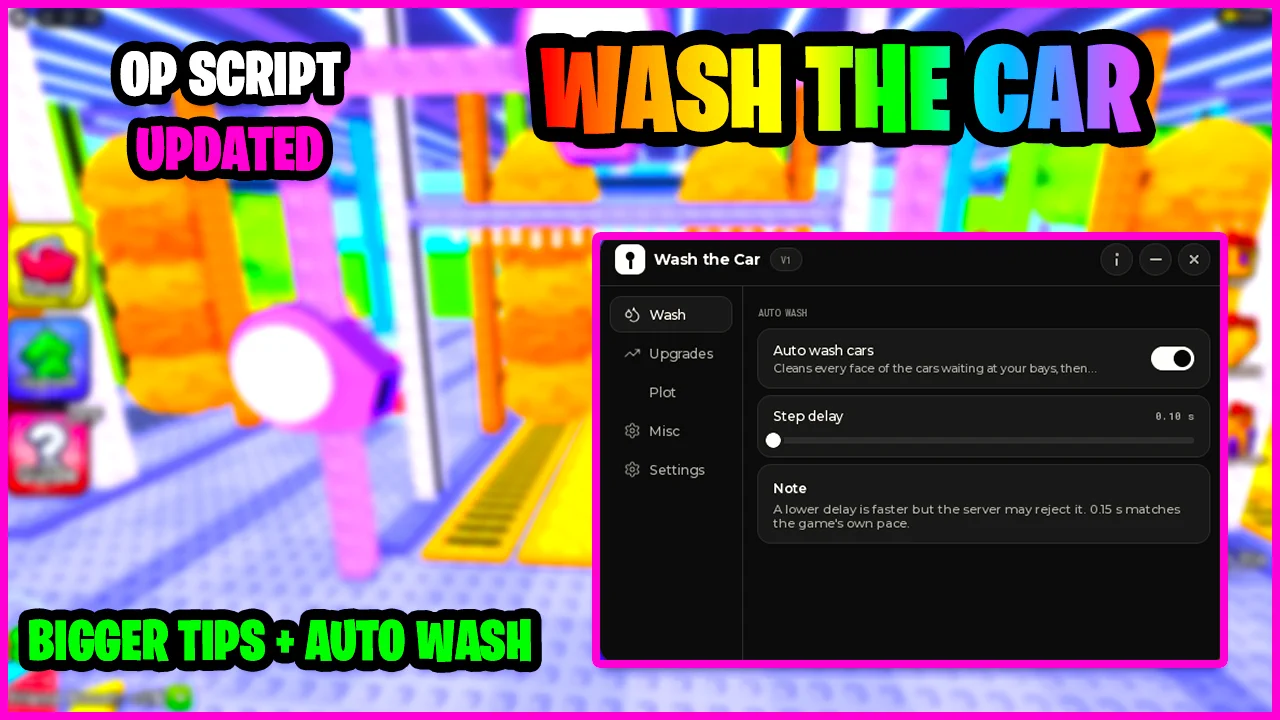
Looking for a Wash the Car script that scrubs every car for you? This keyless script includes Auto Wash Cars, Auto Buy Upgrades and Auto Buy Plot Buttons, so washing, upgrading and expanding your car wash all run from one small menu.
Wash the Car is a Roblox tycoon where you wash the cars that pull into your bays for cash and tips, then spend it on brushes, water jets, dryers and conveyors that make your car wash faster and pay more.
Wash the Car Script Features
- Auto Wash Cars — Cleans every face of the cars waiting at your bays, then moves on to the next one.
- Step Delay — Sets how fast it scrubs, from 0.10 seconds up; 0.15 seconds matches the game's own pace.
- Auto Buy Upgrades — Buys the upgrades you select as soon as you can afford them.
- Upgrade Picks — Choose between Sponge Size, Walk Speed, More Income and Bigger Tips.
- Skips Maxed Upgrades — Upgrades that are maxed or too expensive are skipped automatically.
- Buy Affordable Now — A one-shot button that does a single pass over your selected upgrades.
- Auto Buy Plot Buttons — Walks onto the cheapest affordable button on your plot, such as new bays, brushes and water jets.
- Max Price — Sets a price cap so Auto Buy Plot Buttons skips the expensive buttons.
- Check Intervals — Control how often it checks for upgrades and plot buttons, such as every 1 or 2 seconds.
- Keyless — No key system, shortlink or whitelist: paste the loadstring and the menu opens.
Credits go to MonQer Hub for making this script — join their Discord to get the updates: discord.gg/5wtZHWRnHA
Download Wash the Car Script:
1Last checked: October 16, 2026 on the Delta executor — script attached and the menu loaded. Game updates can break scripts at any time; the developer's Discord above usually has the newest version.
How To Use The Wash the Car Script
- Open Roblox and launch Wash the Car.
- Start your preferred Roblox executor.
- Copy the Wash the Car script.
- Paste the script into your executor.
- Execute the script.
- Turn on Auto wash cars on the Wash tab, then Auto buy upgrades on the Upgrades tab and Auto buy plot buttons on the Plot tab.
How The Wash the Car Loop Works
Auto Wash Cars handles the cars at your bays, cleaning every side before moving on, and Step Delay decides how fast it goes. Set it too low and the server may reject the scrubs; 0.15 seconds matches the game.
The cash and tips feed the other two tabs. Auto Buy Upgrades spends it on Sponge Size, Walk Speed, More Income and Bigger Tips, and Auto Buy Plot Buttons walks onto the cheapest button on your plot to add bays, brushes and jets, with Max Price keeping it away from the expensive ones.
Wash the Car Script FAQ
Is the Wash the Car script keyless?
What Step Delay should I use?
Why did Auto Buy Plot Buttons skip a button?
More Roblox Scripts
 Survive The Slope Script – Auto Upgrade All, Auto Buy Material & Per-Limb Upgrades
 Wizard Alchemy Script – Auto Farm, Infinite Spins, ESP & More
![+1 TNT Mining Script [UPD 0.9] – Auto Farm, Auto Sell, Auto Rebirth & Auto Buy Best TNT](/wp-content/uploads/2026/09/tnt-mining-script-300x196.webp) +1 TNT Mining Script [UPD 0.9] – Auto Farm, Auto Sell, Auto Rebirth & Auto Buy Best TNT
+1 TNT Mining Script [UPD 0.9] – Auto Farm, Auto Sell, Auto Rebirth & Auto Buy Best TNT
 +1 Slinky Escape Script – Auto Farm, Auto Walk & Auto Rebirth
![[NEW] Hypershot Gunfight Script – Silent Aimbot, ESP, Triggerbot & More! (2026)](https://tr.rbxcdn.com/180DAY-862832bec03c9bf80435f973aec4112a/768/432/Image/Webp/noFilter) [NEW] Hypershot Gunfight Script – Silent Aimbot, ESP, Triggerbot & More! (2026)
[NEW] Hypershot Gunfight Script – Silent Aimbot, ESP, Triggerbot & More! (2026)
 Roblox Forsaken Script (2026) – Auto Farm, Auto Complete Generators, AFK Farm, Kill Eliminate & More!
 Steal An Egg Script – Two Hubs: Auto Steal, Kill Aura & Value Filters
![[🐉UPD] Fish It! Script – AUTO FARM + INSTANT CATCH & EVENT FISH (NO KEY!)](https://tr.rbxcdn.com/180DAY-d612acdb03ba6e23e0c637328e22efc1/768/432/Image/Webp/noFilter) [🐉UPD] Fish It! Script – AUTO FARM + INSTANT CATCH & EVENT FISH (NO KEY!)
[🐉UPD] Fish It! Script – AUTO FARM + INSTANT CATCH & EVENT FISH (NO KEY!)
 NEW Brainrot Evolution Script – MAX LEVEL + INFINITE DIAMONDS & TROPHIES!
![[UPD] Blue Lock: Rivals Unlock Cards & Caps, Auto Dribble, Auto Goal, INF Stamina & More!](https://tr.rbxcdn.com/180DAY-809ffd9f8bec2baf4e92c52e40e505b4/768/432/Image/Webp/noFilter) [UPD] Blue Lock: Rivals Unlock Cards & Caps, Auto Dribble, Auto Goal, INF Stamina & More!
[UPD] Blue Lock: Rivals Unlock Cards & Caps, Auto Dribble, Auto Goal, INF Stamina & More!
 Defeat Anime RNG Script – Auto Roll, Auto Farm Waves, Auto Upgrade & Infinite Tower
 Stream A Cheese Pull Script – Auto Stream, Crates, Rebirth & Fly