
+1 TNT Mining Script [UPD 0.9] – Auto Farm, Auto Sell, Auto Rebirth & Auto Buy Best TNT
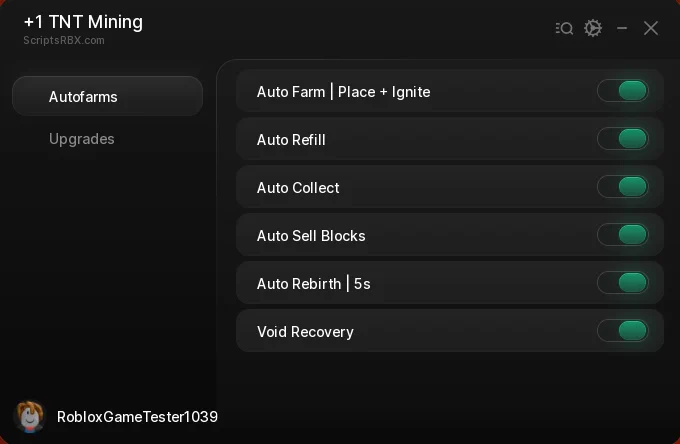
Looking for a +1 TNT Mining script that keeps the mine blowing up while you do something else? This one runs the whole loop — Auto Farm places and ignites TNT, Auto Collect grabs the blocks, Auto Sell turns them into cash and Auto Rebirth resets you every five seconds once you can — with an Upgrades tab that spends the money for you.
+1 TNT Mining [UPD 0.9] is a Roblox game where you place TNT to blast through a mine, collect the rare blocks it uncovers, sell them for cash and buy stronger TNT and deeper areas.
Below you can review the available functions, learn what each option does, and find basic usage information.
+1 TNT Mining Script Features
- Auto Farm | Place + Ignite — Places TNT and lights it on a loop, so the mine keeps getting blasted without you touching anything.
- Auto Refill — Tops your TNT back up whenever you run out, so Auto Farm never stalls on an empty inventory.
- Auto Collect — Picks up every block the explosions uncover instead of leaving them in the rubble.
- Auto Sell Blocks — Sells what you collected as soon as you have it, so cash keeps flowing into the upgrades.
- Auto Rebirth | 5s — Checks every five seconds and rebirths the moment the requirement is met.
- Void Recovery — Puts you back on the mine if a blast drops you into the void, so a fall never ends the farm.
- Auto Buy Best TNT — Buys the strongest TNT you can afford the moment the cash is there.
- Auto Equip Best TNT — Switches you onto the best TNT you own, so the farm always uses your biggest blast.
- Auto Buy Next Area — Unlocks the next area of the mine as soon as you can pay for it.
- Auto Upgrade Mine Luck — Keeps buying the Mine Luck upgrade so rarer blocks show up more often.
- Two-Tab Menu — Autofarms holds the loop toggles; Upgrades holds the spending ones.
- Keyless — No key system, no shortlink and no whitelist — paste the loadstring and the menu opens.
Written in-house by Ryx rather than mirrored from another developer — the loader is hosted on the ScriptsRBX GitHub. Join the Discord for updates: discord.gg/nXe86GVv9x
Download +1 TNT Mining Script:
1Last checked: September 8, 2026 on the Delta executor — script attached and the menu loaded. Game updates can break scripts at any time; the developer's Discord above usually has the newest version.
How To Use The +1 TNT Mining Script
- Open Roblox and launch +1 TNT Mining.
- Start your preferred Roblox executor.
- Copy the +1 TNT Mining script.
- Paste the script into your executor.
- Execute the script.
- On the Autofarms tab switch on Auto Farm, Auto Collect and Auto Sell Blocks, then open Upgrades and turn on Auto Buy Best TNT.
+1 TNT Mining Script Showcase
Want to see the mine running itself before you use it? The full showcase is on YouTube: [NEW] TNT MINING SCRIPT - NO KEY | AUTO FARM, AUTO SELL BLOCKS, AUTO REBIRTH, AUTO BUY BEST TNT!.

The video runs through the menu as it appears above — Auto Farm placing and igniting, Auto Collect and Auto Sell keeping the cash moving, and the Upgrades tab spending it on bigger TNT.
Menu Layout
The menu is titled +1 TNT Mining and has two tabs. Autofarms is the loop: Auto Farm | Place + Ignite, Auto Refill, Auto Collect, Auto Sell Blocks, Auto Rebirth | 5s and Void Recovery.
Upgrades is where the cash goes: Auto Buy Best TNT, Auto Equip Best TNT, Auto Buy Next Area and Auto Upgrade Mine Luck. Turn the Autofarms on first, then the Upgrades, and the two feed each other.
+1 TNT Mining Script FAQ
Is the +1 TNT Mining script keyless?
What does Void Recovery do?
Does Auto Rebirth reset my progress?
Which executor should I use?
More Roblox Scripts
 Anime Avatar Fighting Script – Auto Farm, Auto Summon & Auto Upgrade
![[RELEASE🎉] Anime Warriors III Script — Auto Farm, Auto Raid, Auto Quest & More!](https://tr.rbxcdn.com/180DAY-aa717796314d2704ad5951d6a79b5d35/768/432/Image/Webp/noFilter) [RELEASE🎉] Anime Warriors III Script — Auto Farm, Auto Raid, Auto Quest & More!
[RELEASE🎉] Anime Warriors III Script — Auto Farm, Auto Raid, Auto Quest & More!
 🔑 Roblox DOORS Script – Auto Win, ESP, No Jumpscare & God Mode (2026)
![[UPDATE 🔪] Forsaken Script – Auto Block, Aimbot & OP PvP GUI (2026)](https://tr.rbxcdn.com/180DAY-ade3a7a657babdc426cad38911362395/768/432/Image/Webp/noFilter) [UPDATE 🔪] Forsaken Script – Auto Block, Aimbot & OP PvP GUI (2026)
[UPDATE 🔪] Forsaken Script – Auto Block, Aimbot & OP PvP GUI (2026)
 Fishing Master Script – Auto Cast, Auto Pull Minigame, Auto Sell & ESP
 Deadly Indian Truck Driving Script (2026) – Teleport, Unlock Trucks & Complete All Stages
 Bubble Gum Simulator INFINITY Script (2026) – Auto Farm & More!
 Plants vs Brainrots Script – AUTO MONEY + KILL AURA + AUTO BUY!
![Raft 101 [ALPHA] Script Teleport Items + Auto Farm + GOD MODE (NO KEY)](https://tr.rbxcdn.com/180DAY-1032878a7bdefb3a116fb66272f1f0b5/768/432/Image/Webp/noFilter) Raft 101 [ALPHA] Script Teleport Items + Auto Farm + GOD MODE (NO KEY)
Raft 101 [ALPHA] Script Teleport Items + Auto Farm + GOD MODE (NO KEY)
 Run For Brainrots Script – Instant Get CELESTIAL Script (2026)
 Bike For Egg Script – Auto Farm Eggs, WalkSpeed & JumpPower
 Keyless 99 Nights in the Forest Script VoidWare