
Survive The Slope Script – Auto Upgrade All, Auto Buy Material & Per-Limb Upgrades
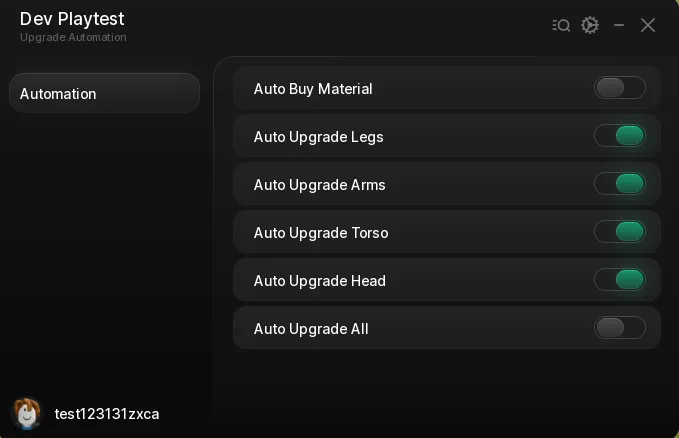
Looking for a Survive The Slope script that spends your earnings for you? This one is six toggles on one tab — Auto Buy Material, one Auto Upgrade per body part, and Auto Upgrade All to cycle Legs, Arms, Torso and Head on repeat — so every run's cash goes straight back into your next distance record.
Survive The Slope is a Roblox game where you slide down a mountain as fast as you can, dodge obstacles, and lose when every bone is broken. The further you get the more you earn, and upgrades push your record further.
Below you can review the available functions, learn what each option does, and find basic usage information.
Survive The Slope Script Features
- Auto Buy Material — Fires the material purchase twice a second, so the resource you upgrade with keeps stocking up without you opening the shop.
- Auto Upgrade Legs — Buys the Legs upgrade twice a second for as long as it is on.
- Auto Upgrade Arms — Same loop for Arms.
- Auto Upgrade Torso — Same loop for Torso.
- Auto Upgrade Head — Same loop for Head.
- Auto Upgrade All — One toggle that cycles Legs, Arms, Torso and Head in order, a tenth of a second apart, then repeats — so all four climb together instead of one running away.
- Robux Prompt Guard — While any toggle is on, the game's buy-with-Robux prompt is closed the instant it appears rather than left blocking the screen. It closes the prompt; it never accepts it.
- Keyless — No key system, no shortlink and no whitelist — paste the loadstring and the menu opens.
Written in-house rather than mirrored from another developer — the loader is hosted on the ScriptsRBX GitHub. Join the Discord for updates: discord.gg/nXe86GVv9x
Download Survive The Slope Script:
1Last checked: September 16, 2026 on the Delta executor — script attached and the menu loaded. Game updates can break scripts at any time; the developer's Discord above usually has the newest version.
How To Use The Survive The Slope Script
- Open Roblox and launch Survive The Slope.
- Start your preferred Roblox executor.
- Copy the Survive The Slope script.
- Paste the script into your executor.
- Execute the script.
- Switch on Auto Buy Material and Auto Upgrade All, then go slide — the cash from each run is spent while you play.
Menu Layout
The menu is a Rayfield window — titled Dev Playtest with the subtitle Upgrade Automation, which is just the name left in the build — with a single Automation tab.
Top to bottom: Auto Buy Material, Auto Upgrade Legs, Auto Upgrade Arms, Auto Upgrade Torso, Auto Upgrade Head, Auto Upgrade All. Each is a plain on/off toggle with nothing to configure.
Auto Upgrade All Versus The Per-Limb Toggles
The four per-limb toggles each run their own loop, so if you turn on Legs alone, only Legs climbs. That is the one to use when you want to pour everything into a single stat.
Auto Upgrade All is a different loop: it buys Legs, waits a tenth of a second, buys Arms, then Torso, then Head, then half a second later starts again. All four rise in step, which is what you want for pushing distance since every limb breaks eventually.
You can run Auto Buy Material alongside either. There is no reason to run Auto Upgrade All and the individual toggles at the same time — they fire the same purchase and the game just rejects what you cannot afford.
About The Robux Prompt
When an upgrade costs more than you have, this game offers to cover the difference with Robux. Firing upgrades twice a second would leave that prompt permanently on screen, so while any toggle is on the script closes it as soon as it opens.
It only closes the prompt. Nothing in the loader accepts a purchase, and the Robux dialog itself is a Roblox core prompt that no script can confirm on your behalf.
Survive The Slope Script FAQ
Is the Survive The Slope script keyless?
Can this spend my Robux?
Why is the menu called Dev Playtest?
Should I use Auto Upgrade All or the single toggles?
Which executor should I use?
More Roblox Scripts
 Build the Pyramid Script – Auto Farm Blocks, Auto Place & Auto Upgrades
 Bug Evolution Script – Teleport Orbs, Auto Farm, Auto Evolve & Biome Teleport
 Anime Avatar Fighting Script – Auto Farm, Auto Summon & Auto Upgrade
![[NEW] Fisch Infinite Money Script for Roblox Fisch – Easy and Fast Wealth!](https://tr.rbxcdn.com/180DAY-17ce753c4b1f087c5eda362c24457e25/768/432/Image/Webp/noFilter) [NEW] Fisch Infinite Money Script for Roblox Fisch – Easy and Fast Wealth!
[NEW] Fisch Infinite Money Script for Roblox Fisch – Easy and Fast Wealth!
 Slayers 2 Script – Two Hubs: Auto Farm Quests, Auto Boss, Auto Parry & NPC ESP
![[🌋] Build An Island Script 2026 – Auto Farm Infinite Coins, Auto Craft + More!](https://tr.rbxcdn.com/180DAY-e1a97a5129df37ed6433421b3118cb0f/768/432/Image/Webp/noFilter) [🌋] Build An Island Script 2026 – Auto Farm Infinite Coins, Auto Craft + More!
[🌋] Build An Island Script 2026 – Auto Farm Infinite Coins, Auto Craft + More!
 Bike For Egg Script – Auto Farm Eggs, WalkSpeed & JumpPower
 Run for Squishy Dumpling! Script – Auto Farm, Auto Collect, Fast Wins & More (2026)
 Roblox Forsaken Script (2026) – Auto Farm, Auto Complete Generators, AFK Farm, Kill Eliminate & More!
![[Ghost] Roblox Hunty Zombie Script – Auto Farm + Auto Win/Skip](https://tr.rbxcdn.com/180DAY-bdf3eef0bee26fce9ed9a9dc7a16b67c/768/432/Image/Webp/noFilter) [Ghost] Roblox Hunty Zombie Script – Auto Farm + Auto Win/Skip
[Ghost] Roblox Hunty Zombie Script – Auto Farm + Auto Win/Skip
 Bubble Gum Simulator INFINITY Script (2026) – Auto Farm & More!
 Steal Animal Egg Script – Auto Farm Eggs, Rarity Filter, Egg Teleport & Walk Speed