
Retail Tycoon 2 Script – Auto Buy Stock, Instant Delivery, Pick Up Stock & Teleports
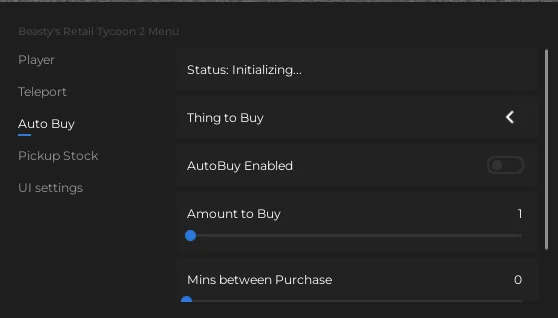
Looking for a Retail Tycoon 2 script? Beasty's script keeps your shelves full: Auto Buy Stock with item, amount and timing settings, Instant Delivery and a Pick Up Stock run, plus teleports, Fly, Noclip and Anti AFK.
Retail Tycoon 2 is a Roblox tycoon where you build and run your own store, order stock, pick it up from the loading dock, fill your shelves and grow into a bigger shop.
Retail Tycoon 2 Script Features
- Auto Buy Stock — Buys the item you choose, in the amount and at the interval you set.
- Instant Delivery — Delivers purchased stock instantly.
- Pick Up Stock — Takes you and your car to the loading dock, picks up stock and unloads it at your store.
- Teleports — Slots 1-6, Alans Autos, the loading dock and other players.
- Player Speed & Jump Boost — Move and jump faster.
- Fly & Noclip — Fly and walk through anything.
- Anti AFK — Stops the idle kick.
Hub 1 is Beasty9334. All credit goes to the developers.
1. Beasty RT2 – Auto Buy Stock, Instant Delivery and Teleports
1How To Use The Retail Tycoon 2 Script
- Open Roblox and launch Retail Tycoon 2.
- Start your preferred Roblox executor.
- Copy the Retail Tycoon 2 script.
- Paste the script into your executor.
- Execute the script.
- Turn on the features you want in the menu that opens.
Beasty RT2: What It Does
Beasty's script opens with Right Control. Auto Buy Stock buys the item, amount and interval you choose, Instant Delivery skips the wait and Pick Up Stock fetches stock from the loading dock and unloads it at your store. Teleports, Fly, Noclip, speed and jump boosts and Anti AFK round it out.
Retail Tycoon 2 Script FAQ
How do I open the Retail Tycoon 2 script menu?
Press Right Control to open or close it.
More Roblox Scripts
 [RELEASE] MUGEN Script (2026) – Auto Farm, Auto Skills, Auto Respawn & More!
 Wizard Alchemy Script – Auto Farm, Infinite Spins, ESP & More
 Blue Lock Rivals Script – Auto Goal, Auto Dribble, Ball Aimbot & Infinite Stamina
 [🎃HALLOWEEN UPDATE] MM2 Script – AUTO FARM CANDY, GODMODE & INFINITE COINS (NO KEY 2026)
 [UPD] Blue Lock: Rivals Unlock Cards & Caps, Auto Dribble, Auto Goal, INF Stamina & More!
 Blue Heater 2 Script – Kill Aura, Auto Dungeon, Auto Tower & Auto Farm
 🔥 Blue Heater 2 Script [RELEASE] – OP Kill Aura, Auto Dungeon & Fast Auto Farm!
 Bubble Gum Simulator INFINITY Script (2026) – Auto Farm & More!
 +1 Assassin Leveling Script – Auto Farm Stage, Auto Train, Auto Farm World Boss & Auto Rebirth
 OP Bee Swarm Simulator Script 2026 🐝 Auto Quest + Fast Farm!
 Land or Die Script – Auto Farm, Kill Aura, Auto Gather, Auto Craft & ESP
 Be a Brainrot Script Auto Farm Best Brainrot (Roblox 2026)