
Saber Simulator Script – Auto Swing, Auto Sell, Auto Buy Weapons & Teleport Crowns
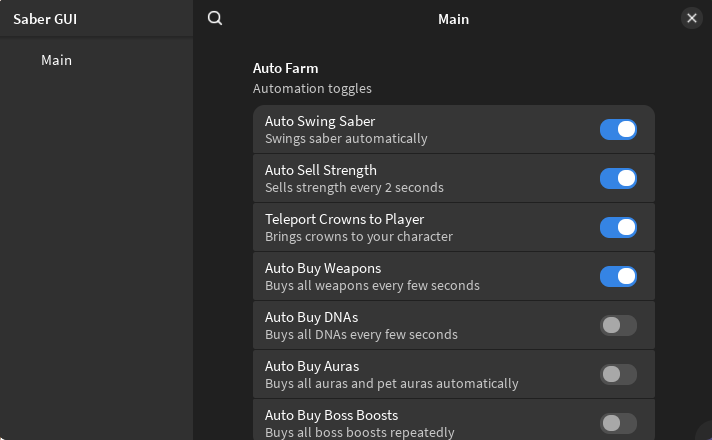
Looking for a Saber Simulator script? Our own ScriptsRBX script automates the whole loop: Auto Swing Saber, Auto Sell every two seconds, Auto Buy Weapons and Teleport Crowns, plus optional DNA, aura and boss boost buying.
Saber Simulator is a Roblox simulator where you swing your saber to build strength, sell it for coins, buy better sabers, DNA and auras, and fight bosses and other players.
Saber Simulator Script Features
- Auto Swing Saber — Builds strength constantly.
- Auto Sell Strength — Sells every two seconds.
- Teleport Crowns — Collects all crowns instantly.
- Auto Buy Weapons — Keeps upgrading your saber.
- Optional Auto Buy — Buys DNA, auras and boss boosts if you turn it on.
Hub 1 is ScriptsRBX: discord.gg/nXe86GVv9x. All credit goes to the developers.
1. ScriptsRBX – Auto Swing, Auto Sell, Auto Buy and Teleport Crowns
1How To Use The Saber Simulator Script
- Open Roblox and launch Saber Simulator.
- Start your preferred Roblox executor.
- Copy the Saber Simulator script.
- Paste the script into your executor.
- Execute the script.
- Turn on the features you want in the menu that opens.
ScriptsRBX: What It Does
Our own script closes the swing, sell and buy loop: Auto Swing Saber builds strength, Auto Sell cashes it in every two seconds and Auto Buy Weapons spends the coins. Teleport Crowns collects every crown, and you can also auto buy DNA, auras and boss boosts.
Saber Simulator Script FAQ
Should I turn on the optional auto buys?
Turn on DNA first, since it raises how much strength you can hold. Auras and boss boosts are worth buying once your saber upgrades slow down.
More Roblox Scripts
 Forsaken Script – Auto Win, Auto Farm, Auto Block & Aimbot
 [RELEASE] Jujutsu Infinite Script – Auto farm & Quest! Instant kill, Infinite Skills
 King Legacy Script – Auto Farm Level, Auto Stats, Kill Aura & Auto Fishing
 Steal An Anime Egg Script – Auto Farm Selected Rarity, Teleport + Claim & Auto Step Boost
 Weak Legacy 2 Script – Auto Farm, Kill Aura, Auto Quest & Auto Breathing
Roblox Forsaken Script (2026) – Auto Farm, Auto Complete Generators, AFK Farm, Kill Eliminate & More!
 [RELEASE🎉] Anime Warriors III Script — Auto Farm, Auto Raid, Auto Quest & More!
 NEW Free DIG Script! 🔥 Auto Pile, Auto Dig, Auto Pizza & More! (NO KEY 2026)
 OP 99 Nights in the Forest Script – Bring All, Auto Win + Kill Aura (NO KEY!)
 [🦈UPD] Fish It! Script 🐟 No Key – Auto Farm & Instant Catch
 Clone to Steal Eggs Script – Auto Steal, Auto Hatch, Auto Manage Clones & Auto Rebirth
 Racket Rivals Script – Auto Play Ball, Auto Win & Yen Farm