
+1 Loot To Forge Script – Auto Farm Dungeon, Auto Forge, Auto Sell & Auto Rebirth
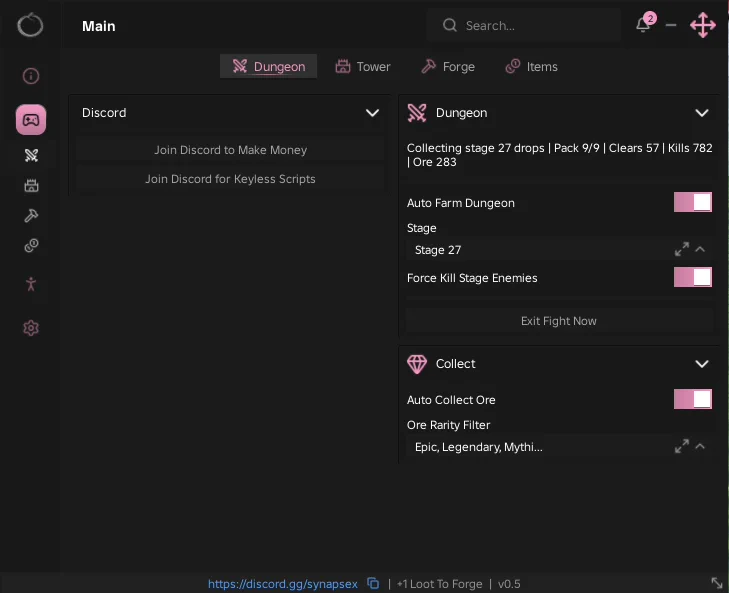
Looking for a +1 Loot To Forge script that handles the grind for you? This keyless Ouroboros Hub includes Auto Farm Dungeon, Auto Collect Ore, Auto Forge, Auto Sell and Auto Rebirth, so the whole loop of clearing stages, picking up ore, forging gear and rebirthing runs from one menu.
+1 Loot To Forge is a Roblox experience where you fight through dungeon stages and bosses for ore, forge that ore into weapons and armor, and rebirth for bigger power and coin multipliers.
The script is designed for players who want a simpler way to test automated gameplay features without repeatedly performing every action manually. Below, you can review the available functions, learn what each option does, and find basic usage information.
+1 Loot To Forge Script Features
- Auto Farm Dungeon — Clears the dungeon stage you pick on a loop and shows clears, kills and ore collected as it goes.
- Stage Selection — Choose which dungeon stage the farm runs, such as Stage 27.
- Force Kill Stage Enemies — Finishes off every enemy in the stage so each clear counts.
- Exit Fight Now — Leaves the current fight straight away with one button.
- Auto Collect Ore — Picks up the ore that enemies drop without walking to it.
- Ore Rarity Filter — Collects only the ore rarities you tick, for example Epic, Legendary and Mythic.
- Auto Forge — Forges your ore into gear automatically and reports what it made and how much ore it used.
- Target Gear — Pick the item the forge should make, such as the Great Sword.
- Spend Best Ore First — Uses your highest rarity ore before the rest, with a Keep Per Ore slider from 0 to 100.
- Auto Rebirth — Rebirths as soon as you qualify, with a Rebirth Now button and a readout of rebirths, level, coins and tickets.
- Auto Buy Upgrades — Buys the upgrades you choose, such as Ore Pack Capacity, with a Buy Upgrade Now button.
- Auto Train — Trains in the area you pick, from Area 1 upward as your rebirths unlock them.
- Auto Click — Clicks for you with a Clicks Per Second slider that goes up to 20.
- Auto Sell — Sells loot by item type and rarity, from Common up to Secret, while keeping 0 to 50 of each item.
- Sell All Now — Clears out everything that matches your sell filters in one press.
- Keyless — No key system: paste the loadstring and the menu opens.
Credits go to Ouroboros for making this script — join their Discord to get the updates: discord.gg/synapsex
Download +1 Loot To Forge Script:
12Last checked: September 23, 2026 on the Delta executor — script attached and the menu loaded. Game updates can break scripts at any time; the developer's Discord above usually has the newest version.
How To Use The +1 Loot To Forge Script
- Open Roblox and launch +1 Loot To Forge.
- Start your preferred Roblox executor.
- Copy the +1 Loot To Forge script.
- Paste the script into your executor.
- Execute the script.
- Open the Dungeon tab, pick a stage and turn on Auto Farm Dungeon and Auto Collect Ore, then set up Auto Forge and Auto Sell.
Popular features include:
- Auto Farm Dungeon
- Auto Collect Ore
- Auto Forge
- Auto Sell
- Auto Rebirth
- Auto Buy Upgrades
How The Dungeon, Forge And Sell Loop Works
Start on the Dungeon tab. Pick a stage, switch on Auto Farm Dungeon and Force Kill Stage Enemies, and the status line keeps count of your clears, kills and ore. Turn on Auto Collect Ore in the Collect group with a rarity filter so your pack fills only with ore worth keeping.
Next, the Forge tab turns that ore into gear. Set a Target Gear, leave Spend Best Ore First on, and use Keep Per Ore if you want to hold some back. The status line tells you what was forged and how much ore went into it.
Finally, on the Items tab, Auto Sell gets rid of low rarity drops so your backpack never fills up, and Auto Rebirth with Auto Buy Upgrades spends your progress as soon as you earn it.
+1 Loot To Forge Script FAQ
Is the +1 Loot To Forge script keyless?
Why is my backpack full while Auto Farm Dungeon is running?
More Roblox Scripts
 Make Rugs Script – Auto Make Rug, Auto Sell To Customers, Auto Roll Yarn & Auto Hire
 Ride a Dino Script – Auto Tame Dinos, Auto Sell, Auto Equip Best & Dino ESP
 Harpoon a Fish Script – Auto Harpoon, Auto Dive, Auto Feed Fish & Auto Open Crates
 Climb For Animals Eggs Script – Auto Steal Eggs, Auto Hatch, Teleport to Zone & Auto Rebirth
 Anime Zero Script – Auto Farm, Auto Skills, Auto Join & Auto Skill Tree
 +1 Assassin Leveling Script – Auto Farm Stage, Auto Train, Auto Farm World Boss & Auto Rebirth
 Bubble Gum Simulator Infinity Script – Lunor hub
 Huss Valley Script – Auto Cross, Auto Dodge, Auto Catch & ESP
 Arsenal Script Keyless
 Roblox Forsaken Script (2026) – Auto Farm, Auto Complete Generators, AFK Farm, Kill Eliminate & More!
 LUNAR GLOW Grow a Garden – Auto Collect Moonlit & Lunar Points!
 World Fighters Script Fast Auto Farm Fighters (Roblox 2026)