
+1 DMG FPS Script – Auto Farm Stage, Auto Buy Best Gun, Auto Train & Auto Rebirth
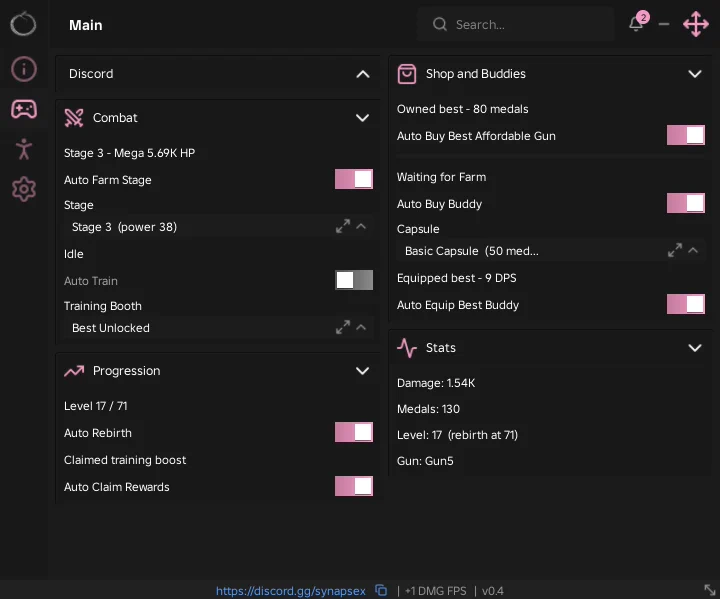
Looking for a +1 DMG FPS script that shoots the grind for you? This Ouroboros Hub build puts the whole loop on four groups — Auto Farm Stage on the stage you pick, Auto Buy Best Affordable Gun, Auto Train at the best booth, Auto Buy Buddy and Auto Equip Best Buddy — with Auto Rebirth and Auto Claim Rewards so nothing waits on you.
+1 DMG FPS is a Roblox shooter where every hit on the invading AI adds damage, medals unlock better guns, buddies fight alongside you, and rebirths give the big power jumps that open new areas.
Below you can review the available functions, learn what each option does, and find basic usage information.
+1 DMG FPS Script Features
- Auto Farm Stage — Fights the stage you picked on a loop. The status line above it shows the target and its HP, and the loop claims the stage's win pad as part of each clear — that is the 'Auto Claim Win Pad' other listings mention.
- Stage — Dropdown of stages with the power each one needs, so you can see whether you are strong enough before you send Auto Farm at it.
- Auto Train — Parks you at a training booth and trains on a loop, with a Training Booth dropdown that defaults to Best Unlocked.
- Auto Buy Best Affordable Gun — Buys the strongest gun your medals can cover the moment you can afford it. The line above shows what you currently own.
- Auto Buy Buddy — Opens the capsule you pick — Basic Capsule and up — whenever you have the medals for it.
- Auto Equip Best Buddy — Swaps in the highest-DPS buddy you own whenever a better one drops. The line above shows the equipped one's DPS.
- Auto Rebirth — Rebirths the moment you reach the level, which the Progression group shows as Level X / rebirth-at-Y.
- Auto Claim Rewards — Collects rewards, including the training boost, as they become claimable.
- Stats Panel — Live Damage, Medals, Level with the rebirth threshold, and the equipped gun, so you can watch the loop work without opening the game's own menus.
- Movement and Performance — On the settings tab: WalkSpeed, Fly Speed, Infinite Jump, Instant ProximityPrompt, FPS Boost, Disable 3D Rendering, Hide UI On Start, and Auto Reconnect on Kick.
- Keyless — No key system, no shortlink and no whitelist — paste the loadstring and the hub opens.
Credits go to Ouroboros for making this script — join their Discord to get the updates: discord.gg/synapsex
Download +1 DMG FPS Script:
1Last checked: September 18, 2026 on the Delta executor — script attached and the menu loaded. Game updates can break scripts at any time; the developer's Discord above usually has the newest version.
How To Use The +1 DMG FPS Script
- Open Roblox and launch +1 DMG FPS.
- Start your preferred Roblox executor.
- Copy the +1 DMG FPS script.
- Paste the script into your executor.
- Execute the script.
- Pick a stage whose power you can beat, switch on Auto Farm Stage, then turn on Auto Buy Best Affordable Gun, Auto Equip Best Buddy and Auto Rebirth.
Menu Layout
The hub opens on a Main tab with four groups. Combat has the stage status line, Auto Farm Stage, the Stage dropdown, Auto Train and the Training Booth dropdown. Progression shows your level against the rebirth threshold and holds Auto Rebirth and Auto Claim Rewards.
Shop and Buddies has Auto Buy Best Affordable Gun, Auto Buy Buddy with the Capsule dropdown, and Auto Equip Best Buddy, each with a status line above it saying what you own or what it is waiting on. Stats is a live readout of Damage, Medals, Level and your gun.
The settings tab carries the movement and performance toggles, config import and export, and Unload Script.
Picking A Stage
The Stage dropdown lists each stage with the power it takes, and the Combat status line shows the current target's HP. Pick the highest stage your power clears comfortably rather than the highest one listed — if the loop cannot kill the target it just sits there.
Auto Farm Stage handles the win pad itself. When a stage clears, the status reads Claiming win pad, it collects, and the loop starts the next round. There is no separate toggle for it.
What The Loader Does
That loadstring is the Ouroboros loader, not the script. It reads the game's creator id, looks it up in a table of around two hundred games, and loadstrings the matching file from the same GitHub — for +1 DMG FPS that is a large obfuscated file. The loader itself is readable and has no key step; the game file cannot be read, so everything above is described from the menu labels and readouts rather than the code.
The loader also refuses to run on Solara and Xeno and shows an unsupported-executor screen instead. Use a different executor for this one.
+1 DMG FPS Script FAQ
Is the +1 DMG FPS script keyless?
Where is Auto Claim Win Pad?
Auto Farm Stage is on but nothing is happening?
Why does it say my executor is unsupported?
More Roblox Scripts
 Steel Fighters Script – Auto Farm Fights, Auto Roll Robots, Auto Collect Junk & Auto Rebirth
 Make Rugs Script – Auto Make Rug, Auto Sell To Customers, Auto Roll Yarn & Auto Hire
 Ride a Dino Script – Auto Tame Dinos, Auto Sell, Auto Equip Best & Dino ESP
 Harpoon a Fish Script – Auto Harpoon, Auto Dive, Auto Feed Fish & Auto Open Crates
 Climb For Animals Eggs Script – Auto Steal Eggs, Auto Hatch, Teleport to Zone & Auto Rebirth
 Anime Zero Script – Auto Farm, Auto Skills, Auto Join & Auto Skill Tree
 Deadly Indian Truck Driving Script (2026) – Teleport, Unlock Trucks & Complete All Stages
 Rope an Animal Script – Auto Rope Animals, Rarity Filter, Auto Sell & Auto Treadmill
 UPDATE Blue Lock Rivals Script Unlock Don Lorenzo, Grillz Explosion Goal Effect
 MY WATERPARK Roblox Script – Infinite Money & Auto Farm
 Hole Fishing Script – Spawn Fish, Infinite Bag Space & Auto Upgrades
 Free Fisch script Max LEVEL NO Key FASTEST AUTO FISH, PERFECT CATCH, Auto Farm