
Scream And Run Script – INSTA WIN, Monster ESP & Auto Search
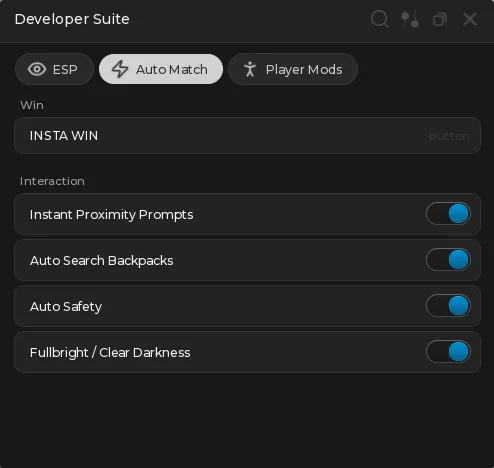
Looking for a Scream And Run script that ends the round the moment you want it to? The headline feature is INSTA WIN — one button that puts you straight on the exit, so you can take the win every round instead of running the whole map.
Scream And Run is a Roblox horror-chase experience where you search the map, avoid the monster and reach the exit before it catches you.
Alongside the win button the menu carries full Monster and Lock ESP, instant proximity prompts, auto searching and movement mods. Below you can review the available functions, learn what each option does, and find basic usage information.
Scream And Run Script Features
- INSTA WIN — Finds the exit part in the map and puts you on it, finishing the round on the spot. Press it again each round for as many wins as you want.
- Instant Proximity Prompts — Removes the hold time on every prompt, so searching and interacting happens the moment you press the key.
- Auto Search Backpacks — Works through backpacks on its own instead of you walking to each one and holding it.
- Auto Safety — Keeps you out of trouble while the other options run.
- Fullbright / Clear Darkness — Strips the darkness out of the map so you can see the monster and the layout without a torch.
- Monster Highlight — Puts a highlight on the monster so it is visible through walls.
- Monster Distance — Shows how far away the monster is, so you know whether it is worth moving.
- Monster Box — Draws a box around the monster on top of the highlight.
- Lock ESP — Marks every lock in the map so you are not hunting for the next one.
- Teleport To Nearest Lock — Sends you to the closest lock in one press.
- Teleport To Safest Lock — Sends you to the lock furthest from the monster instead of the closest one.
- Custom WalkSpeed — Turns on a walk speed override, set with the slider underneath it.
- Custom Jump Height — Same for jump height, again with its own slider.
Written in-house by Ryx rather than mirrored from another developer — the loader is hosted on the ScriptsRBX GitHub. Join the Discord for updates: discord.gg/nXe86GVv9x
Download Scream And Run Script:
1Last checked: September 2, 2026 on the Delta executor — script attached and the menu loaded. Game updates can break scripts at any time; the developer's Discord above usually has the newest version.
How To Use The Scream And Run Script
- Open Roblox and launch Scream And Run.
- Start your preferred Roblox executor.
- Copy the Scream And Run script.
- Paste the script into your executor.
- Execute the script.
- Open the Auto Match tab and press INSTA WIN to take the round, or switch on the ESP options first if you would rather play it out.
Popular features include:
- INSTA WIN
- Instant Proximity Prompts
- Monster ESP
- Lock ESP
- Auto Search Backpacks
- Fullbright
- Teleport To Safest Lock
- Custom WalkSpeed
Scream And Run Script Showcase
Want to see INSTA WIN before you run it? The full showcase is on YouTube: Scream And Run Script – INSTA WIN, Instant Proximity Prompts, Monster ESP (Keyless).
The video runs through the menu as it appears above — pressing INSTA WIN to take the round, then the ESP options, auto search and the movement sliders.
Menu Layout
The menu has three tabs. ESP holds the monster options and the lock options with their two teleports. Auto Match holds INSTA WIN plus the interaction toggles. Player Mods holds the walk speed and jump height overrides with a slider each.
Press K to hide or show the menu.
Scream And Run Script FAQ
Is the Scream And Run script keyless?
What does INSTA WIN do?
Can I keep winning every round?
Which executor should I use?
More Roblox Scripts
 Dead Rails Script – 3 Working Hubs (Auto Bond, Auto Win, Infinite Bonds)
 Fisch Script Keyless Free Skibidi Client V6
![Paradox [RELEASE] Script Auto Farm God Mode & Auto Farm (Roblox 2026)](https://tr.rbxcdn.com/180DAY-5e161b74bde27ca233072c7da5185331/768/432/Image/Webp/noFilter) Paradox [RELEASE] Script Auto Farm God Mode & Auto Farm (Roblox 2026)
Paradox [RELEASE] Script Auto Farm God Mode & Auto Farm (Roblox 2026)
 Fish It Script – Instant Fishing, Auto Farm & Fast Catch (KEYLESS)
![[UPDATE 🔪] Forsaken Script – Auto Block, Aimbot & OP PvP GUI (2026)](https://tr.rbxcdn.com/180DAY-ade3a7a657babdc426cad38911362395/768/432/Image/Webp/noFilter) [UPDATE 🔪] Forsaken Script – Auto Block, Aimbot & OP PvP GUI (2026)
[UPDATE 🔪] Forsaken Script – Auto Block, Aimbot & OP PvP GUI (2026)
 Anime Breaker Script – Auto Farm, Auto Gacha, Auto Equip Best & Auto Rank Up
 Tank Wars Script – Auto Collect, Auto Buy, Auto Upgrade & Auto Attack
![Abyss [BETA] Roblox Script – Auto Catch, Infinite Oxygen & Auto Fish](https://tr.rbxcdn.com/180DAY-a50fd9eecb82185523f4c95fcb39f263/768/432/Image/Webp/noFilter) Abyss [BETA] Roblox Script – Auto Catch, Infinite Oxygen & Auto Fish
Abyss [BETA] Roblox Script – Auto Catch, Infinite Oxygen & Auto Fish
 What are Roblox Scripts?
 🎲 Ultimate Script Hack for Bubble Gum Simulator INFINITY – Auto Farm, Infinite Gems & More!
 Steal An Egg Script – Two Hubs: Auto Steal, Kill Aura & Value Filters
![[NEW] Restaurant Tycoon 3 Script – AUTO COOK + INSTANT MONEY (NO KEY!)](https://tr.rbxcdn.com/180DAY-b5aa3d1ad2c1524816211fb343ce4086/768/432/Image/Webp/noFilter) [NEW] Restaurant Tycoon 3 Script – AUTO COOK + INSTANT MONEY (NO KEY!)
[NEW] Restaurant Tycoon 3 Script – AUTO COOK + INSTANT MONEY (NO KEY!)