
Volleyball Legends Script – Auto Play, Auto Spin, Stat Changer & Power Serve
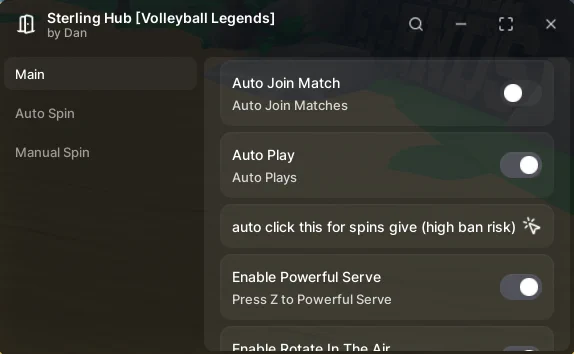
Looking for a Volleyball Legends script, or a Haikyuu Legends script from before the game was renamed? Sterling Hub covers both: Auto Play, Auto Spin, a stat changer for dive speed, spike, set and block power, and a power serve.
Volleyball Legends, first released as Haikyuu Legends, is a Roblox volleyball game inspired by the Haikyuu anime, where you spin for styles and abilities, then serve, set, spike and block in team matches to climb the leaderboard.
Volleyball Legends Script Features
- Auto Play — Handles the plays in a match for you once you are in.
- Auto Spin — Keeps rolling spins for styles.
- Stat Changer — Changes Dive Speed, Spike Power, Speed, Set Power and Block Power.
- Powerful Serve — Puts extra force behind your serve.
- Ball Power — Adds power to the ball when you hit it.
Hub 1 is Sterling Hub: discord.gg/cqPU6Wz2SP. All credit goes to the developers.
1. Sterling Hub – Auto Play, Auto Spin, Stat Changer and Power Serve
1How To Use The Volleyball Legends Script
- Open Roblox and launch Volleyball Legends.
- Start your preferred Roblox executor.
- Copy the Volleyball Legends script.
- Paste the script into your executor.
- Execute the script.
- Turn on the features you want in the menu that opens.
Sterling Hub: What It Does
Sterling Hub targets the two grinds in Volleyball Legends: matches and spins. Auto Play carries the rallies once you have queued and picked your style, and Auto Spin keeps rolling. Its stat changer rewrites Dive Speed, Spike Power, Speed, Set Power and Block Power, and Powerful Serve and Ball Power put more force behind the ball. The same hub also supports other games, such as Jujutsu Infinite.
Volleyball Legends Script FAQ
Is Haikyuu Legends the same game as Volleyball Legends?
More Roblox Scripts
 [🎃HALLOWEEN UPDATE] MM2 Script – AUTO FARM CANDY, GODMODE & INFINITE COINS (NO KEY 2026)
 MUGEN Script – Auto Farm Player, Auto Attack, Auto Skills & Auto Respawn
 +1 Assassin Leveling Script – Auto Farm Stage, Auto Train, Auto Farm World Boss & Auto Rebirth
 OP 99 Nights in the Forest Script – Bring All, Auto Win + Kill Aura (NO KEY!)
 Ink Game Script – Auto Win, Phantom Dash, Fly, Noclip & Fling
 [UPDATE 🔪] Forsaken Script – Auto Block, Aimbot & OP PvP GUI (2026)
 NEW Free DIG Script! 🔥 Auto Pile, Auto Dig, Auto Pizza & More! (NO KEY 2026)
 Hunty Zombie Script – Auto Farm, Kill Aura, Auto Replay & Auto Skills
 Racket Rivals Script – AUTO WIN + AUTO SHOOT & INFINITE YEN!
 NEW! Hypershot Script – Silent Aimbot, ESP & Instant Kill (Free & Keyless)
 [❄️WINTER] Jujutsu Infinite Script Keyless Auto Farm level and BOSS!
Forsaken Script – Auto Win, Auto Farm, Auto Block & Aimbot