
Hypershot Script – Silent Aimbot, ESP, Hitbox & Fly
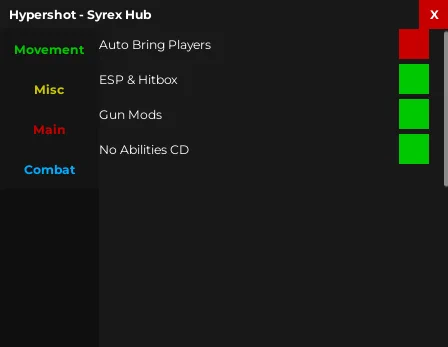
Looking for a Hypershot script? Both of our Hypershot scripts are on this page, newest first: Syrex Hub with Aimbot, Hitbox, ESP, Fly and No Cooldown, and cqz's script with Silent Aimbot, full ESP and Weapon Chams.
Hypershot is a fast Roblox shooter where you drop into short gunfights, pick up weapons and abilities and try to top the leaderboard before the round ends.
Hypershot Script Features
- Aimbot — Locks your shots onto targets.
- Hitbox — Enlarges what counts as a hit.
- ESP — Shows enemies through walls.
- Fly — Lets you fly around the map.
- Infinite Jump — Jump again in mid-air as often as you want.
- No Cooldown — Removes the wait between actions.
Hub 1 is Syrex Hub. Hub 2 is cqz: discord.gg/GAupKCQqA8. All credit goes to the developers.
1. Syrex Hub – Aimbot, Hitbox, ESP, Fly and No Cooldown
1How To Use The Hypershot Script
- Open Roblox and launch Hypershot.
- Start your preferred Roblox executor.
- Pick one of the Hypershot scripts below and copy it. Hub 1 is the newest.
- Paste the script into your executor.
- Execute the script.
- Turn on the features you want in the menu that opens.
Syrex Hub: What It Does
Syrex Hub leans on aim help: the Aimbot locks onto targets, Hitbox enlarges what counts as a hit and ESP marks enemies through walls. Fly, Infinite Jump and No Cooldown cover movement.
2. cqz – Silent Aimbot, ESP, Full Bright and Chams
cqz's script has a Silent Aimbot that corrects shots without your crosshair snapping, ESP with boxes, names, distance and health, plus Full Bright, an aspect ratio changer, an FPS Boost and arm and weapon chams.
1Hypershot Script FAQ
Which Hypershot script should I use?
More Roblox Scripts
 Build a Bunker Script – Auto Farm Scraps, Bring All Items, Godmode & Auto Collect Money
 Wash the Car Script – Auto Wash Cars, Auto Buy Upgrades & Auto Buy Plot Buttons
 🔥 Blue Heater 2 Script [RELEASE] – OP Kill Aura, Auto Dungeon & Fast Auto Farm!
 Steal A Brainrot Egg Script – Auto Hatch, Egg Finder & Teleports
 1+ Spinjitsu Escape Script – Auto Win, Auto Rebirth, Auto Hatch (No Key)
 Plants vs Brainrots Script – Kill Aura, Auto Buy, Auto Farm & Auto Collect Money
 Hooked Script – Auto Win, Coin Farm & Match Farming
 Be a Brainrot Script – Auto Farm, Best Brainrot Select, Rarity Filter & Teleports
 Blue Lock Rivals Script – Auto Goal, Auto Dribble, Ball Aimbot & Infinite Stamina
 Build a Zoo Script – Auto Collect, Auto Farm & Auto Fish
 Pull Lucky Blocks Script – Auto Pull, Auto Open, Auto Rebirth & Auto Upgrade
 Steal An Anime Egg Script – Auto Farm Selected Rarity, Teleport + Claim & Auto Step Boost