
Huss Valley Script – Auto Cross, Auto Dodge, Auto Catch & ESP
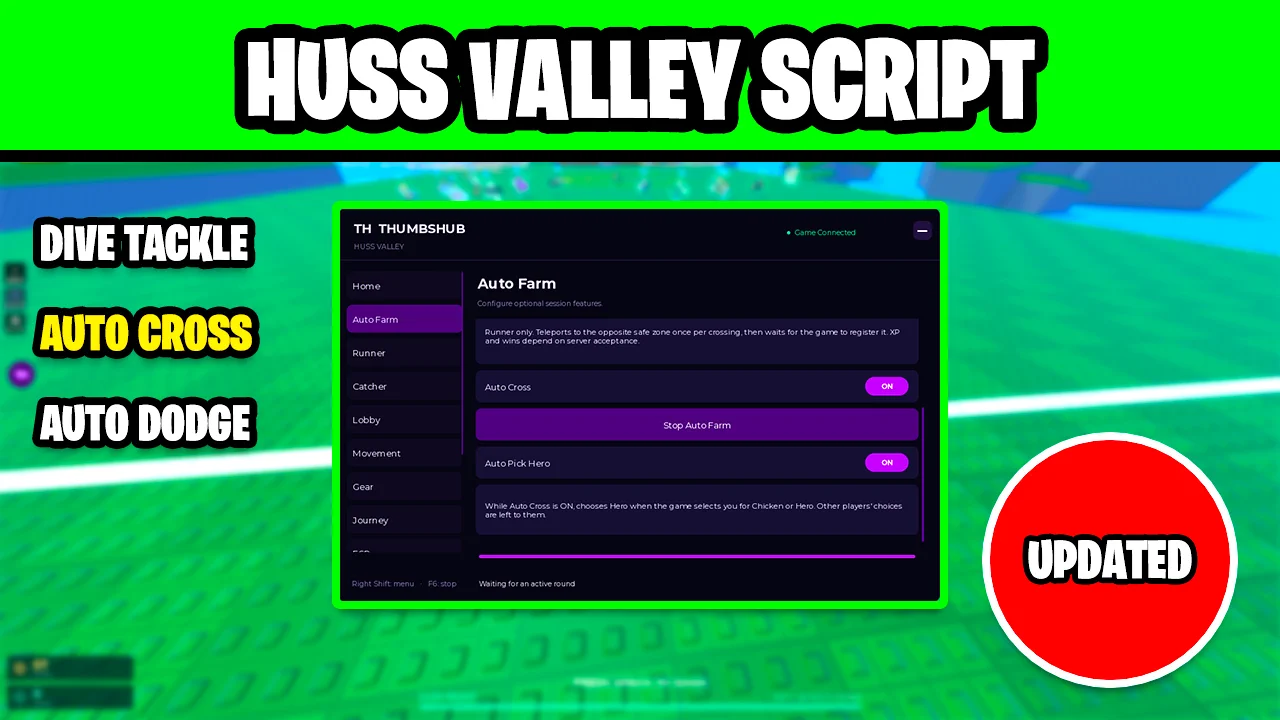
Looking for a Huss Valley script that crosses, dodges and tackles for you? ThumbsHub includes Auto Cross, which teleports runners to the opposite safe side, Auto Dodge against predicted tackles, Auto Catch with Dive Tackle for catchers, and ESP with role chams and tackle range, all from one menu.
Huss Valley is a Roblox running game where each round one side has to reach the opposite safe zone while catchers try to tackle them. You dash and dodge to get across, earn coins, gems and wins, vote on the next map, and sometimes get picked as the Chicken or the Hero.
Huss Valley Script Features
- Auto Cross — As a runner, teleports you to the opposite safe zone once per crossing and waits for the game to count it.
- Auto Pick Hero — Picks Hero for you when the game selects you for Chicken or Hero.
- Auto Dodge — Dodges active attacks and predicted tackle paths from catchers closing in on you, and can react to feints.
- Dodge Direction — Choose which way it dodges, such as Sideways Only.
- Light Crowd Assist — Adds light crowd nudges while your own movement keeps priority; hold Left Alt to pause them.
- Suggested Crossing Path — Shows a route guide that compares walkable paths and nearby catcher risk.
- Auto Catch — As a catcher, goes after runners for you with a Best Intercept targeting mode.
- Dive Tackle — Tackles using movement prediction and the game's own attack cooldowns.
- Auto Vote — Votes for your favorite map, such as The Valley, after a delay you set.
- Leave AFK Automatically — Turns the game's AFK mode off for you.
- Auto Self Rescue & Gear — Rescues yourself and uses your equipped gear near enemies when you have charges.
- ESP — Player Role Labels, Role Chams, Gem Labels and the catchers' maximum tackle range, up to a distance you set.
- Visuals — Camera FOV slider, a Nearby Catcher Warning and a Combat HUD.
- Auto Spectate — Spectates automatically after you are eliminated.
Credits go to ThumbsHub for making this script — join their Discord to get the updates: discord.gg/RDZCNHGznU
Download Huss Valley Script:
1Last checked: October 6, 2026 on the Delta executor — script attached and the menu loaded. Game updates can break scripts at any time; the developer's Discord above usually has the newest version.
How To Use The Huss Valley Script
- Open Roblox and launch Huss Valley.
- Start your preferred Roblox executor.
- Copy the Huss Valley script.
- Paste the script into your executor.
- Execute the script.
- Open the Auto Farm tab and turn on Auto Cross for runner rounds, and turn on Auto Catch on the Catcher tab for catcher rounds. Right Shift opens the menu and F6 stops everything.
Runner And Catcher Rounds
When you are a runner, Auto Cross on the Auto Farm tab teleports you to the opposite safe zone once per crossing and waits for the game to register it, and Auto Pick Hero answers the Chicken or Hero choice for you. If you would rather run it yourself, Auto Dodge on the Runner tab reacts to incoming tackles and the Suggested Crossing Path shows a lower-risk route.
When you are a catcher, Auto Catch picks targets with Best Intercept and Dive Tackle times the tackle with movement prediction. On the ESP tab, Role Chams and Catcher Maximum Tackle Range show who is who and how far a tackle reaches.
Huss Valley Script FAQ
Is Auto Cross safe in public servers?
How do I open or stop the Huss Valley script?
Why is Auto Cross not giving me wins?
More Roblox Scripts
 Tank Wars Script – Auto Collect, Auto Buy, Auto Upgrade & Auto Attack
![[RELEASE] MUGEN Script (2026) – Auto Farm, Auto Skills, Auto Respawn & More!](https://tr.rbxcdn.com/180DAY-ed94ca22c209afbccb4d35f4a5423084/768/432/Image/Webp/noFilter) [RELEASE] MUGEN Script (2026) – Auto Farm, Auto Skills, Auto Respawn & More!
[RELEASE] MUGEN Script (2026) – Auto Farm, Auto Skills, Auto Respawn & More!
 Hole Fishing Script – Spawn Fish, Infinite Bag Space & Auto Upgrades
 Steal Animal Egg Script – Auto Farm Eggs, Rarity Filter, Egg Teleport & Walk Speed
 1+ Spinjitsu Escape Script – Auto Win, Auto Rebirth, Auto Hatch (No Key)
![[UPD] Blue Lock: Rivals Script Free Script – Auto Goal, Teleport, Infinite Stamina & More!](https://tr.rbxcdn.com/180DAY-809ffd9f8bec2baf4e92c52e40e505b4/768/432/Image/Webp/noFilter) [UPD] Blue Lock: Rivals Script Free Script – Auto Goal, Teleport, Infinite Stamina & More!
[UPD] Blue Lock: Rivals Script Free Script – Auto Goal, Teleport, Infinite Stamina & More!
 Survive LAVA for Brainrots Script Infinite Jumps & God Mode
 99 Nights in the Forest Script Infinite Diamonds & Auto Farm
 +1 Slinky Escape Script – Auto Farm, Auto Walk & Auto Rebirth
 XGRS Dig & Clean Script – Run Plan, Auto Scrubber, Auto Sell & ESP
 Rivals Free Aimbot & ESP Script
 Defeat Anime RNG Script – Auto Roll, Auto Farm Waves, Auto Upgrade & Infinite Tower